
Spend $50, get $25 OFF — applied automatically.
Skip to Content Skip to Navigation Skip to Footer
Join Membership
Season 2 ·

S2E27 – What Makes a MIDI Keyboard Good for Beatmaking

0:00 / 0:00
This media could not be played.

Never Miss an Episode

Get new podcast episodes delivered to your inbox.

Home/Podcast/S2E27 – What Makes a MIDI...

In this podcast episode of Music Production Made Simple, I talk to you about what I think makes a MIDI Keyboard Good for Beatmaking.

I understand everyone has their own preference, but when using FL Studio, this is my strong opinion to see great results, save money, and see RESULTS in your beats!

49-Key MIDI Keyboard is BEST!

When talking about price, size, and workflow, I truly think the 49-Key is the BEST MIDI Keyboard option for producers (with Semi-Weighted Keys):

MIDI Keyboard and Audio Interface on the Same Desk for a Good Workflow
MIDI Keyboard in front, with audio interface to the right.

Notice how my M-Audio Oxygen Pro MIDI Keyboard is right in front of me to play they keys easily, but I can still access my audio interface within arm’s reach to the right?

That is the awesome beatmaking workflow I’m talking about!

MIDI Keyboards are sold in:

  • Mini
  • 25-Key (Sometimes 32-Key)
  • 49-Key
  • 61-Key
  • 88-Key

And as you’d imagine, the more piano keys on a MIDI Keyboard, the more expensive it is. (As well as it gets A LOT wider!)

So pretty much to summarize this whole podcast episode is 49-Key Semi-Weighted, with Transport buttons that have the LOOP button (that’s pretty much it).

If you want the knobs/sliders, like I said, I’d MISS THEM IF I DIDN’T HAVE THEM.. but they are not totally necessary..

The More You Pay, Doesn’t Mean the Better Experience

Because a MIDI Keyboard has no sounds in it, it doesn’t matter if you buy a $99 MIDI Keyboard or a $1000 MIDI Keyboard.. the fact is, you play sounds with your Virtual Instruments.
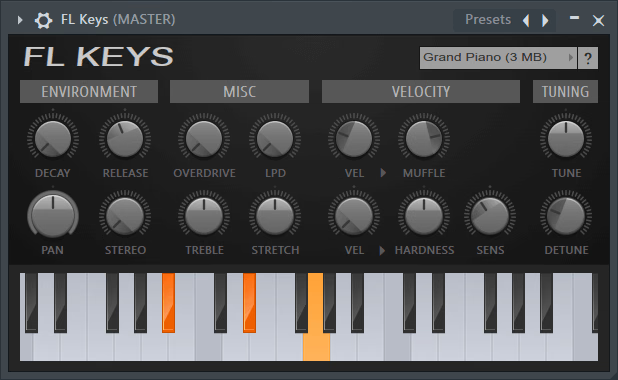
FL Keys - FL Studio Stock Plugin by Image-Line
An example of a Virtual Instrument! (FL Keys)
Learn what version of FL Studio to buy.

Once the price of a MIDI Keyboard increases, you are paying for these types of things:

  • Development/Research time (for things like “advanced chords” which is not a good thing for beatmakers)..
  • “Bonus Software” which you may not ever use
  • Special software that integrates well WITH THAT MIDI KEYBOARD (if you stop using that MIDI Keyboard later on.. you may be “stuck” into their eco system).

In short, the sweet spot is in the middle-range for a MIDI Keyboard.

That’s why I highly suggest the M-Audio Oxygen Pro 49 for my students of my FL Studio courses..
M-Audio Oxygen Pro Review for FL Studio DAW (49-Key Semi-Weighted)
Read my M-Audio Oxygen Pro Review.
Specifically for FL Studio Users

Do All MIDI Keyboards Work Good in All DAWs

This is probably the biggest misconception in this industry.

Reviews will say “this is the BEST MIDI KEYBOARD”.. but they don’t fully explain that each DAW treats a MIDI Keyboard different..

Sometimes a MIDI Keyboard doesn’t work good in a certain DAW at all..

So you have to make sure that the review you’re watching IS SPECIFIC TO YOUR DAW OF CHOICE..

Thankfully, FL Studio has introduced MIDI Scripting, which allows essentially ANY MIDI DEVICE to work well in FL Studio with a MIDI Script (there’s many free ones out there on their forums!)

Community

Questions about this episode

Transcript

S2E27 – What Makes a MIDI Keyboard Good for Beatmaking

  1. Season two, episode 27. What makes a MIDI keyboard good for beat
  2. making? I just want to give you guys my opinion when it comes to buying a MIDI
  3. keyboard in a nice simple fast episode here.
  4. Okay, so before we get into this episode, visit the website
  5. it'sgratuitous.com. I'm a recognized FO Studio trainer.
  6. I have tons of training for you guys, courses for beginners, intermediate, and a bit
  7. of advanced stuff going on there.
  8. So there's over 28 courses. Again, visit the website it'sgratuitous.com.
  9. If you're struggling, you guys can send me an email, and I usually get back to you
  10. within a day. Students from the ages of 16 all the way to 45 have entered the
  11. platform. The whole goal that I'm wanting from a student is someone who is a
  12. self-learner, somebody who really wants to learn to make beats.
  13. They don't really care about what's going on with YouTube.
  14. They just want to learn to make their own beats.
  15. And that is what my website is there for.
  16. Okay. So again, it's gratuitous.com.
  17. Okay, so let's get into a MIDI keyboard and what I suggest to you guys.
  18. Okay. So the first thing when you're looking at a MIDI keyboard out there is does it
  19. work good in your DAW? A lot of times, if you're watching a review, many times these
  20. reviewers do not specify what DAW it's good for.
  21. Alright, this is a problem because not all MIDI keyboards work good in all music
  22. programs. But FL Studio has introduced MIDI scripting.
  23. This is huge because essentially any MIDI keyboard can work good inside of FL
  24. Studio if it requires a MIDI script.
  25. And if it does, many times there's a free one on the image line forums.
  26. And if there isn't, you can also request that somebody write one.
  27. Or if you know Python scripting, you can write your own.
  28. And it's really easy to install.
  29. And it's such an awesome solution because in the early years of FL Studio, some MIDI
  30. keyboards worked good, some didn't.
  31. And now MIDI scripting allows you to essentially say, hey, this stop button, I want
  32. it to be stop. This play button, I want it to be play.
  33. Most often it was the transport buttons, which didn't work very well.
  34. But now MIDI scripting can get that up and running.
  35. So before we go further, I want to let you know that I personally use the MAudio
  36. Oxygen Pro. I've been using it for about two years.
  37. What's really really awesome with it is it's a 49 key and semi-weighted keys.
  38. I have an in-depth review on it.
  39. Again, you guys can check the episode resources to watch the review.
  40. It's been an amazing MIDI keyboard for the price, semi-weighted keys.
  41. I also have a free MIDI script for it.
  42. So again, the first point was does the MIDI keyboard work good in your DAW?
  43. For FL Studio users, again, there's MIDI scripting, so you can typically get a MIDI
  44. keyboard working no matter what nowadays, which is amazing.
  45. The second thing I want to say is the more you pay for a MIDI keyboard doesn't mean
  46. the better experience you're gonna get.
  47. And this is because there's no sounds in a MIDI keyboard.
  48. A lot of people get this confused, they don't understand really how a MIDI keyboard
  49. works. So if you buy a cheap $99 MIDI keyboard, and let's say it's
  50. 49 keys, you're able to play the MIDI keyboard with two hands, and what you're doing
  51. is you are playing the sounds inside your computer.
  52. Now, let's say you go buy a thousand dollar MIDI keyboard and you go and play the
  53. keys, you are again just playing the sounds inside your computer.
  54. That's a really important thing to understand..
  55. A MIDI keyboard has no sounds in it
  56. So when you are paying more money, what you are getting is just a better build
  57. quality, sometimes better features in the in a sense of maybe being a little a
  58. little bit more hands-on. But I also caution you guys
  59. to you know if you have to use hands-on and use third-party software to use
  60. hands-on, such as let's say you purchase a MIDI keyboard from a company and you
  61. have to install tons of software in order to get hands-on.
  62. I highly advise not to get into that, okay?
  63. Because what happens is you kind of get locked into like their ecosystem of all
  64. their software and stuff. That is also why I like this M audio.
  65. It's very, very light. You literally just plug it in.
  66. You can install some software if you want to tweak it a little bit, but you don't
  67. even need the software to use the free MIDI script and stuff like that.
  68. So it's just really lightweight, and I've really enjoyed my time with it.
  69. Okay. Okay, so now the next thing I want to talk about is the size of the MIDI
  70. keyboard. So when you are out there, if you're gonna purchase a MIDI keyboard,
  71. you're gonna see a mini, you're gonna see a 25 key, a 49 key, a 61 key, and an
  72. 88 key. 88, I believe is like a real piano, all right?
  73. Which is huge. Now, depending on your budget, I understand, but
  74. in my opinion, a mini to a 25 key, this is more for like traveling.
  75. You're not gonna get a very good experience when it comes to creating your melodies
  76. because you want to learn to create your own melodies from scratch as a beat maker,
  77. and you want to learn to play with two hands.
  78. Okay. If you want to learn to play with two hands, you guys can check out my piano
  79. course. It's called Piano Lessons for Producers.
  80. It's all from a beatmaker's perspective, learning music theory and improvisation
  81. with two hands on the piano. So a 49 key is the only size
  82. I've ever used. The reason I like a 49 key is it's not huge, so you have to remember
  83. that the different sizes gets more expensive.
  84. So a 25 key to a 49 to a 61, the price keeps going up.
  85. They also start getting bigger, like you know, wider, which means that you need a
  86. bigger desk. And one thing I tell you guys a lot is the workflow is very, very
  87. important. So I like to always have my audio interface right beside the MIDI
  88. keyboard, right to the right, or you know, if your situation right to the left, but
  89. it's the fact that the audio interface is within arm's reach to this MIDI keyboard.
  90. It just allows you to adjust your volume quickly.
  91. once you start get, you know, if you have a nicer audio interface, such as the
  92. Mackey Big Knob Studio, it allows you to go to mono, which is really important to
  93. test. I understand you can do this in FL Studio, but you can do it with a simple
  94. button. All right, it doesn't matter what's going on inside of FL Studio, you can
  95. hit mono. this audio interface also allows you to switch between two sets of
  96. speakers, but I'm just saying that the workflow of having the MIDI keyboard in
  97. front of you, and then the audio interface just to the side that you can, you know,
  98. it's within arm's reach. A 49 key allows for that.
  99. A 61 key does not. Okay, it starts getting quite big, and so
  100. I think the price point for a 49 key is awesome..
  101. I think the size of a 49 key is awesome
  102. And what makes a 49 key really tricky to purchase is not all vendors
  103. offer a 49 key is with semi-weighted keys.
  104. Okay, that's the next thing I want to talk about.
  105. So when it comes to the quality of the keys, I suggest semi-weighted keys, and what
  106. that means is that the keys are just a little bit heavier, they feel a little bit
  107. more like a real piano. Now, if you go and play a real piano and then you go and
  108. play semi-weighted keys, it still doesn't feel very good.
  109. Okay, but if you go and play a piano and then play with non-semi-weighted keys, it
  110. just feels so unreal. All right, so semi-weighted keys I highly suggest, and
  111. again, not all MIDI keyboard manufacturers make a 49 key with semi-weighted
  112. keys. And as soon as the MAudio Oxygen Pro came out, I was like, okay, that's the
  113. MIDI keyboard I'm getting. It had 49 keys, semi-weighted, it is fully loaded in
  114. terms of the sliders, the knobs, and drum pads.
  115. I usually think drum pads are gimmicky on a MIDI keyboard, and we'll talk more about
  116. that in our next point. But I just want to conclude.
  117. All right, so I hope that 49 key and semi-weighted keys, you know, speaks to you,
  118. makes you understand why I really stress that because again, I'm speaking more
  119. towards if you were a student inside of my platform, how to get a good experience as
  120. you're watching the courses because as I teach, this is my setup, and you'll be able
  121. to follow along really, really easy as well.
  122. Now, the final thing I want to talk about is what other features do you want in a
  123. MIDI keyboard? Okay. So sometimes these manufacturers, they've been starting to come
  124. out. with a lot of more bonus features, such as like auto chords or arpiggio
  125. mode And in my opinion, you you want to do that stuff inside your music program.
  126. FL Studio has a pretty good arpigiator built in.
  127. In terms of auto chord mode, I think that stuff's kind of like cheating, right?
  128. You guys really want to learn to program your own MIDI notes.
  129. It's the most rewarding. And as soon as people are taking shortcuts, such as using
  130. pre-made drum loops or pre-made MIDI packs that you literally just drag in and
  131. you're playing someone else's melodies.
  132. In my opinion, it is not making music, it's not making your own beats.
  133. When you put your music on in your car and you're going drive around, it's like you
  134. know in your heart you didn't make that, right?
  135. And you want to learn to program your own melodies.
  136. So when it comes to these advanced features like auto chord mode, I highly advise
  137. not to use that stuff. You want to learn to use the MIDI keyboard and become a
  138. skilled piano player. Okay, that's how you're gonna become a good beat maker.
  139. Now, you know, if you do sampling, that's fine.
  140. That's still also a huge skill as a beat maker.
  141. That's fine. But if you are into original compositions to make your own beats, you
  142. want to learn to play the keys, okay?
  143. So the last thing I want to talk about is essentially the knobs, the sliders, and
  144. the drum pads. So to get the best experience, it really is just having 49
  145. keys and semi-weighted, as well as transport buttons that work.
  146. That's how you're gonna get the best experience inside of your DAW.
  147. So the transport buttons is the stop, the start, the record, the back of bar,
  148. and the forward bar. So in other words, like reverse and forward.
  149. And you want to have the loop button.
  150. Okay.. This allows you to switch between song and pattern mode inside of FL Studio
  151. It gives a really, really good experience.
  152. As soon as you have that, you're going to get a really, really good MIDI keyboard.
  153. Okay. So 49 key, semi-weighted transport buttons with the stop, play,
  154. record, back, forward, and the loop button.
  155. A lot of MIDI keyboards don't offer that.
  156. You'd be surprised. They don't have that loop button.
  157. And for me with FL Studio, I really, really liked it.
  158. But now let's talk a little bit more hands on.
  159. Okay. So the sliders and the knobs.
  160. I don't really use them too much, but recently I was trying to get more hands on a
  161. little bit. And I'm telling you that they are nice to have.
  162. I would personally miss them if I didn't have them, but I don't use them overly.
  163. Okay. So you don't need the knobs and sliders.
  164. So for example, if you want to look at a more affordable MIDI keyboard, but
  165. honestly, this Oxygen Pro for the price just gives you an amazing experience.
  166. You have the semi-weighted keys, you have the sliders, you have the knobs.
  167. Now I want to talk about the drum pads because you might be like, well, I like the
  168. drum pads. Now, a drum pad is no different than a key.
  169. Okay. When you push down a key, it is velocity sensitive.
  170. When you push down a drum pad, it is velocity sensitive.
  171. The only difference is how it feels when you hit it.
  172. When you hit a drum pad, it's kind of rubbery, right?
  173. Kind of cushion-y. That's a drum pad feel.
  174. If you push down a key lightly, or if you push down a key hard, it's also velocity
  175. sensitive. So if you push it down hard, right, you're going to trigger it at that
  176. 127. you know, velocity. That's the max you can get for velocity, with MIDI,
  177. right? Or if you hit it light, you know, it might be triggering a lesser number.
  178. So, in other words, if it's just a single wave sample, you know, you're you're just
  179. adjusting volume, or if you are triggering like some type of virtual instrument, you
  180. might actually be triggering a different sound or a different timbre of sound,
  181. depending on how hard or quiet you push the key or drum pad.
  182. But at the end of the day, the drum pad is like just like the keys, and even when I
  183. play a real piano, many times I even think to myself that it's it's essentially just
  184. like a big drum pad, you know.
  185. Like if you want to hit your keys in a certain way with two fingers or or whatever,
  186. it's like the keys are pretty much the same thing as a drum pad, they just feel
  187. different. And if you really really like working with a drum pad, then my suggestion
  188. to you is buy a dedicated drum pad because typically they're probably going to come
  189. with better drum pad feels, right?
  190. You know what the actual drum pads will feel better, and I think you you would get a
  191. much better experience if that's your way of making beats to buy a dedicated drum
  192. pad for that purpose. but when these companies throw in a drum pad onto a MIDI
  193. keyboard, I personally just think it just increases the cost.
  194. But you guys can do whatever you want, right?
  195. And I'm not saying that it's not useful, you are able to be really creative with a
  196. drum pad and with something like the Oxygen Pro, you have your different banks, so
  197. you can go to different banks, which means that you know, you have a lot of options
  198. again. Again, that's just my opinion, because I'm very heavily with the keys when
  199. I'm making my beats. Now, the next thing I want to say. is when it comes to making
  200. your beats, you also have to understand the process
  201. So typically, our very very first melody, we may be playing with two hands,
  202. but then once it goes on to our next melodies, it's very rare that we're playing
  203. with two hands for our next melodies.
  204. Many times, you know, you might just be playing only like two or three notes in that
  205. next melody, and as a beatmaker, that's just how it works that we start building our
  206. melodies on top of our main melody.
  207. But usually that main melody is like the main emotion with like the two hands, you
  208. try and find that really really catchy melody for the first melody.
  209. Then from there, sometimes you're only just using one hand and you may only be
  210. hitting a couple notes, and so you just got to understand that workflow.
  211. So I hope that helps you guys understand, you know, what makes a MIDI keyboard good
  212. for beat making. And I'll just quickly recap with that.
  213. Okay. So, first of all, does it work good in your DAW when you're watching a review?
  214. Make sure that the reviewer is talking specifically about your DAW.
  215. But again, as an FL Studio user, you don't really have to worry so much anymore
  216. because of MIDI scripting, which is amazing.
  217. And again, if you get the M Audio Oxygen Pro, I also have a free MIDI script on the
  218. image line forums there. It gets your transport buttons working properly.
  219. The next thing is the more you pay doesn't mean the better experience you're gonna
  220. get. If you purchase a $99 MIDI keyboard or a thousand dollar MIDI keyboard, when
  221. you hit the keys, you are triggering your sounds inside your music program.
  222. So the MIDI keyboard has no sounds in it.
  223. We just connect it through USB into our computer.
  224. Then we are playing the sounds inside of our computer.
  225. So a MIDI keyboard has no sounds.,
  226. so So if you pay a super cheap MIDI keyboard or a super expensive MIDI keyboard it's
  227. not like you're getting betterunds.
  228. Okay. So back in the day there were synthesizers where yeah, you buy for a $5,000
  229. synthesizer. Yeah, you might get you know more features, more sounds, whatever, but
  230. it's not like that with a MIDI keyboard, okay.
  231. When you are paying more money, the things that you are getting is you might be
  232. getting you know just a better build quality, such as better keys.
  233. You might start getting the sliders, the knobs, or right, you might be getting drum
  234. pads, you might be getting these advanced features, such as like auto chord mode or
  235. you know an arpigiator built into the MIDI keyboard.
  236. But again, I don't suggest using that kind of stuff on a MIDI keyboard.
  237. You just want to learn to use a MIDI keyboard, you know, learn to play the piano.
  238. Okay. the next thing again, I look for a 49 key, the mini and the
  239. 25, you're not going to be able to play with two hands, at least very well on there.
  240. A 49 key, you can definitely play with two hands very well, and you also have your
  241. octave mode to go up and down.
  242. You can look at the 61. I understand a lot of people like the 61, but I just
  243. really want to stress that when you go to a 61, you are paying more money.
  244. It is bigger, and it's gonna be hard to put that audio interface on the same desk
  245. unless you have a huge desk and a huge room.
  246. And the next point is semi weighted keys.
  247. Okay, so what makes the Oxygen Pro so special is that not all manufacturers make
  248. semi-weighted keys in the 49 key models.
  249. Semi-weighted keys start happening in the 61 key models, and for me, it's always
  250. like, Oh, come on, guys.ys. I would like to purchase that MIDI keyboard, but it you
  251. know, you don't have semi-weighted ke in the 49 again
  252. That's my suggestion to you is semi-weighted keys, it just adds just a little bit
  253. better of enjoyment. If you are making beats very often and you really really like
  254. this stuff, I really really think it's worth that extra money to buy semi-weighted
  255. keys. And the final thing is the knobs and the sliders.
  256. So, what I want to say behind the knobs and the sliders is you don't need them, but
  257. I would miss them if I didn't have them.
  258. All right, and that's it for this episode.
  259. So that's my opinion for what makes a MIDI keyboard good.
  260. Essentially, it's that 49 key semi-weighted.
  261. Not all manufacturers make a 49 key semi-weighted, and that's why the M Audio Oxygen
  262. Pro is special in my opinion. It also has that loop button on the
  263. transport buttons. Okay, so transport is the stop, play, record, back, forward, and
  264. the loop. So the loop allows you to switch between song and pattern mode, it just
  265. gives you a really really good experience, and it even has the drum pads if you guys
  266. like that. And that's it. All right, so I hope you guys enjoyed this episode.
  267. If you guys ever have questions, you guys just visit my website, it's
  268. gratuitous.com. You can use the contact form if you're looking for FL Studio
  269. training. I have tons of courses, such as my piano lessons for producers courses.
  270. I understand when you're wanting to learn the keys.
  271. For me, this is what happened.
  272. I went onto YouTube, I searched learn piano for beginners, and typically what was
  273. coming up was more like classical training or learning how to read sheet
  274. music. And I was just like, he,y I gotta learn the piano for how to make beats.
  275. And what I discovered is it's all about improvisation, it's all about knowing a key
  276. and a scale. All right, that's the secret right there.
  277. If you already know that, then you're you know, like then you know what's up.
  278. But if you don't know a key and a scale, this piano course will be like game
  279. changing for you. You just gotta know the notes that you're allowed to play, which
  280. dictates the chords that you can then play, and then it's all about muscle memory,
  281. it's all about picking one key in scale, knowing it well, and you guys are on your
  282. way. So I will leave all those resources in the episode resources.
  283. You guys could just visit it'sgratuitous.com forward slash podcast.
  284. This episode is season two, episode 27, and you will see the episode resources there
  285. again. If you want to take the piano course, if you want to join the platform, and
  286. if you want to contact me, you guys will be able to find the contact form there.
  287. All right, so before I go, I always advise you guys download my free book.
  288. It's called Five Keys to a Successful Beat.
  289. To access it, you can just go to it's gratuitous.com forward slash five keys, enter
  290. your name and email, and I will email you the book.
  291. All right, you gotta check your email to download it.
  292. There's so many valuable tips in there.
  293. And if you just want to take things slow, you know, if you're just finding out about
  294. my brand or whatever, read the book, try it out.
  295. And if you think my education will help you and will allow you to achieve your beat
  296. making goals, then again, contact me, and I would love to have you guys taking my
  297. courses. Again, students from the age of like 16 to 45, these are just
  298. self-learners who really want to learn how to make beats.
  299. They've reached out, they've contacted me, and most of them have achieved their
  300. goals. They've actually been able to create their own beat.
  301. They don't have to rely on YouTube.
  302. They don't even have to rely on my videos or my courses anymore.
  303. They've broken free from watching videos, and that's my goal.
  304. When I'm trying to teach you guys is at first, it's a huge learning curve to learn
  305. music production. Okay. But as you start to progress, you don't need to be
  306. watching videos as much.
  307. And you can just create how you want to
  308. create.com
  309. and I'm here to help. Thanks for checking out this episode.
  310. I'll talk to you in another one.
GratuiTous Radio Start free Join Membership 0:00/0:00