
Spend $50, get $25 OFF — applied automatically.
Skip to Content Skip to Navigation Skip to Footer
Join Membership
Season 2 ·

S2E18 – Powerful Reverb Tips

0:00 / 0:00
This media could not be played.

Never Miss an Episode

Get new podcast episodes delivered to your inbox.

Home/Podcast/S2E18 – Powerful Reverb Tips

Reverb is probably everyone’s favorite effect.

It creates such a beautiful sound, and can usually help any sound or instrument sit into a mix, if used properly.

In this episode, I mainly wanted to focus on something called Predelay.

What is Predelay on a Reverb?
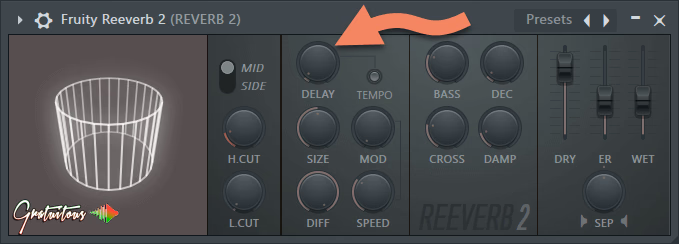
This is the Fruity Reeverb 2 by Image-Line (Makers of FL Studio). The “Delay” knob is the “predelay” on this reverb.

Well, when you play a sound with the reverb effect, the sound can become “masked”. The dry signal (no reverb) and the wet signal (reverb) play at the same time, and because of that, the dry signal can’t be heard as clear, and the reverb will be masked by the dry signal.

In this episode, I show you an example of predelay on a reverb using a piano note.

How Much Predelay Should You Dial In?

For your predelay settings, this is a by ear thing.

When you go too far, you will hear the predelay almost as it’s own instrument, and it will be out of time.

I would say, it’s always safer to have LESS predelay than too much, but if you want a lot of reverb on your snare, without the long tail clogging up your song’s mix, then you can adjust the predelay and DECAY knob accordingly!

Community

Questions about this episode

Transcript

S2E18 – Powerful Reverb Tips

  1. Season two, episode 18, powerful reverb tips.
  2. Now, I really have one main tip I want to get across to you, and that's using
  3. pre-delay. We'll talk more about it in this episode.
  4. But there's some other things I want to talk about with reverb too.
  5. before we get into this episode, I want to tell you guys again, be inside
  6. your program and then search for your answers when you're stuck.
  7. I promise you that is going to help you so much, and no matter what you're trying to
  8. learn in life. Get in there, try it yourself.
  9. Once you get stuck, go look for your answer.
  10. Once you find your answer, get back into the music program.
  11. Okay. If you want to learn more about that, I talk about that in my free book.
  12. It's called Five Keys to a Successful Beat.
  13. Just go to it'sgratuitous.com forward slash five keys, and you guys can get it for
  14. free if you sign up with your email.
  15. I'll also give you special pricing to join the membership.
  16. Okay, so let's talk about some things about reverb.
  17. And so, first of all, what is reverb?
  18. Essentially, I always think about reverb like the space you're in.
  19. There's different types of reverb, like if you talk about convolution reverb, and
  20. like you know, it can get pretty intense, but I don't want to get that intense about
  21. reverb. I usually always like to talk to you about the simple stuff that's
  22. effective. So, as you can hear, this is my voice with some reverb on.
  23. Alright, it sounds, you know, big, but I can adjust it and make my voice, you
  24. know, totally different and make it almost sound like it's in a bathroom, a really
  25. small room. And so when we add reverb onto our instruments, it
  26. immediately helps them blend in.
  27. Too much reverb, your whole mix can kind of sound smeary because nothing is really
  28. precise. But if something is sticking out of the mix too much, that
  29. could be an indication. Just throw some reverb on it, and I promise. you it's gonna
  30. help blend in a lot better Now, some people like to you know use sends for you know,
  31. in other words, they just use like one reverb and they send all their instruments to
  32. it. I'll talk a little bit about that in this episode.
  33. I don't have a preference, but I also like to sometimes add it directly on, and many
  34. times if you have a plug a reverb plugin that allows you to blend both the dry and
  35. the wet, like the fruity reverb 2, which I think is a really really good reverb,
  36. especially now that they added in the mod wheel to kind of scatter the
  37. echoes around. But essentially, I always think about reverb as in trying to
  38. replicate a space or adding on like ambience to a sound.
  39. Instead of that piano note sounding very quick and short, we can immediately give it
  40. a tail, but it's a beautiful tail, something that can really blend.
  41. Now, the main thing I want to talk about in this episode, though, for you for you to
  42. learn is take advantage of what's called pre-delay on a reverb.
  43. Now, if you're adjusting reverb on your instrument in the mixing stage and you're
  44. finding that you just can't get your reverb to stand out, well, you know, typically
  45. what you're gonna do is, well, I'm gonna add more reverb, and you're gonna do that
  46. by increasing like the wet knob or by increasing the decay knob, which is how long
  47. that tail is, right? But what that is gonna do is it's going to make too much
  48. reverb, all right? You're gonna have too much reverb going on in your track.
  49. So what you can do is you can use pre-delay.
  50. And so what it does is it delays the reverb by just a little bit.
  51. So imagine if the piano plays.
  52. Here's a piano note with reverb.
  53. And here's the piano note with pre-delay.
  54. pre-delay. Now I really really exaggerated the
  55. And here's the piano note with a better dial than pre-delay.
  56. So what's happening is that the reverb is actually being delayed.
  57. So what's happening is we're actually able to hear that piano note.
  58. And then we're saying after 10 milliseconds or 15 milliseconds or 30 milliseconds,
  59. then play the reverb. And so what that allows the reverb to do is first of all, you
  60. get a nice clear piano note, right?
  61. It's not being masked by reverb.
  62. So we get the clean dry piano note.
  63. Since the pre-delay is delaying the reverb, we actually get the full volume at
  64. a later time, which means that we're actually hearing that reverb louder.
  65. Because if we had no pre-delay, what happens is the regular dry note and the wet
  66. note play at the same time, and essentially they kind of mask each other.
  67. With pre-delay, you get the dry note, it plays, and then now we can have a shorter
  68. decay time because it allows the reverb to be heard more clearly
  69. because the original note isn't being played.
  70. But that's how I often use pre delay.
  71. It allows me to mix in more reverb more aggressively with shorter
  72. tails. And that is my little trick for how I get a lot of reverb without it
  73. sounding like too much reverb.
  74. Okay, just use some pre delay, and then you can have less decay.
  75. So play around with with pre-delay, really try it out.
  76. a good sound to practice pre-delay on is a snare.,
  77. Okay okay? Because the snare is very, very quick, and you can really hear that if
  78. there's too much pre-delay, it kind of sounds almost like a k.
  79. Like it's you can actually hear it.
  80. You want to just well, it all depends on what kind of sound you're trying to
  81. achieve. But let's just say in a basic mixing environment where we have a snare, we
  82. want to add some reverb on. We're finding that the reverb is getting lost.
  83. So let's say we put like 20 to 30 second a milliseconds of pre-delay on
  84. there. Now you can have a less decay value.
  85. So you get louder reverb, less tail, and it plays this a little bit later.
  86. Okay. the next thing I will talk about is using a low cut and
  87. a high cut on the reverb. Now, some reverbs have this built in.
  88. First of all, you need to understand about series and parallel processing.
  89. I'm not going to get too much into that, and I think I have a podcast episode on
  90. that. So you can check it on my website.
  91. You can just search, use a search bar, go series or search just parallel, and
  92. something should come up. But if we put a reverb just in series and it doesn't have
  93. a dry and a wet, then it automatically just becomes like the wet signal.
  94. Okay. So I usually do like to have a dry and a wet signal when I'm working with
  95. reverb because it really allows you to blend in what you want.
  96. If you want more information on that, you can check out my course.
  97. It's called FL Studio Mixer Workflow.
  98. Or if you join the membership, you can watch all the courses.
  99. So that is just kind of series and parallel processing.
  100. I like to have a parallel track or the wet track with the reverb.
  101. You can blend it in. On that wet track, you can adjust a low cut.
  102. So such as cutting out the low lows on reverb.
  103. Many times you don't need those low lows.
  104. It allows your bass to cut through more.
  105. And very often you can also cut the highs on reverb too, depending on the sound
  106. you're wanting to get things to stand out.
  107. Because at the end of the day, we are limited to our frequency space, and we have to
  108. create space for all our different instruments.
  109. And reverb is an effect that can really take up a lot of space.
  110. It can do it in a pleasant way, and we can have a lot of control over it, such as
  111. again the pre-delay and the decay and all that stuff.
  112. The decay is just how long that reverb is playing out.
  113. The pre-delay actually delays that reverb by however much you've
  114. adjusted it after the initial note.
  115. So if the piano would play, it would play 30 milliseconds later.
  116. Again, allowing you to get a louder reverb and a shorter tail.
  117. Now, one thing I want to talk about, which I've seen a lot of people mention over
  118. the years, and I've tried it myself, but I'm still not in favor of any way.
  119. Some people say that you know they only use reverb on like a send, which means that
  120. they'll send all their instruments in through one reverb.
  121. And the benefit of this is that it's lower CPU usage because a reverb is more heavy
  122. on your CPU, and you only have to use one reverb, you only have to set up one
  123. reverb, and then you can dial in how much reverb you want from each instrument.
  124. For example, you can say I want the piano at a hundred percent, so we get a hundred
  125. percent of the dry signal and a hundred percent of the reverb.
  126. Let's just say, let's say the guitar, let's say we only send let's say 50% or like
  127. 35% to that reverb, and so that is how you can get more and less reverb, but
  128. still use the same reverb, and a lot of people like this sound because they say it
  129. sounds more cohesive. So, again, you can use the sands for.
  130. You know, I really like using sends just for workflow and convenience, but many
  131. times if I want a different sound, there's nothing wrong with opening up another
  132. reverb and you know changing it up.
  133. Now I just want to quickly talk about the Fruity Reverb 2.
  134. All right. So over my years, I've used quite a few different reverbs, and I really
  135. do like the Fruity Reverb 2. They recently introduced the mod wheel, which
  136. allows you to break up the consistency of a reverb.
  137. Okay. And so what can happen is, you know, if you're always hitting like the same
  138. notes over and over, like the reverb can kind of build up.
  139. But with a mod wheel, it kind of skews those a little bit.
  140. And it just makes it sound more natural.
  141. And so what I'm saying is, you know, I've I even have the Fab Filter Pro R
  142. Reverb. I it's really powerful, it's really cool, it's really complex.
  143. But for myself, I find it's kind of like so complex that it doesn't allow me to like
  144. just flow fast. It's something that it's like if you want to have a really special
  145. reverb or have super super good control over your reverb, look to something like Fab
  146. Filters Pro R, which is the reverb plugin.
  147. But the Fruity Reverb 2 by FL Studio is so versatile,
  148. right? I really like how visual it looks again with that new mod wheel.
  149. It's I I so again on my FL Studio template.
  150. Again, if you check out the free five keys book, sign up, you will get special
  151. pricing to the membership. You also have an option to grab my FL Studio template at
  152. a discount. And in my FL Studio template, I use the Fruity Reverb 2
  153. for two of those reverb sends.
  154. And I adjust them a little bit differently just to get a quick different sound.
  155. Now you can add a reverb directly onto a sound.
  156. There's nothing wrong with that.
  157. But you do want to have a reverb, such as the Fruity Reverb 2, which allows you to
  158. get the dry and wet signal, and you can get a good blend.
  159. Okay. So there you guys go. I think there's a you know that's a lot of things to
  160. know about a reverb. so what is a reverb?
  161. Essentially, it just adds like ambience, and like I think people say it's just like
  162. a bunch of echoes, essentially.
  163. but you can dial in a long tail, a short tail, you can kind of copy the sound
  164. of a room, and again, there's even different styles of reverbs.
  165. And I'll leave you if you want to do research on that, but you can look up like
  166. convolution reverbs and you know check it out on YouTube.
  167. There's a lot of cool videos where they kind of use like an impulse response.
  168. but the main one I wanted to really get across to you was the pre-delay.
  169. Okay, play with that with a snare, really try it out, test it.
  170. I promise you it's going to allow you to get a lot of reverb sound without a
  171. super long decay tail. Okay, so that is this episode.
  172. If you guys have any questions, you guys feel free to reach out to me.
  173. I have been working behind the scenes here.
  174. I'm going through every single one of my old blog posts.
  175. There's over 200 of them, and I'm updating the text and I'm creating a new video
  176. for each one. And I've already started, so you guys can visit my YouTube channel.
  177. So youtube.com forward slash it's gratuitous.
  178. one is what is a VST, and another. one will be coming out the differences between
  179. VST3 and VST2 if you guys are on the email list, you guys will be updated on all
  180. that. Or again, you guys can just subscribe on YouTube or subscribe to the podcast
  181. if you like this episode. So again, if you guys want to learn FL Studio and check
  182. out my courses, I highly suggest downloading my free book.
  183. It's called Five Keys to a Successful Beat.
  184. So simple, it becomes creative.
  185. You can download it by going to it'sgratuitous.com forward slash five keys.
  186. You will have to sign up, and I will send you an email to download it.
  187. Again, there will there will be special pricing to the membership.
  188. And if you guys ever have questions, you feel free to send me an email.
  189. So just visit my website, you can visit the contact page, and I'll usually get back
  190. to you within a day or two. Thanks for tuning in, and I'll talk to you in the next
  191. episode.
GratuiTous Radio Start free Join Membership 0:00/0:00
