
Spend $50, get $25 OFF — applied automatically.
Skip to Content Skip to Navigation Skip to Footer
Join Membership
Season 3 ·

S3E07 – Music Producers Have Full Control

0:00 / 0:00
This media could not be played.

Never Miss an Episode

Get new podcast episodes delivered to your inbox.

Home/Podcast/S3E07 – Music Producers Have Full...

Did you know that you as the music producer have more control than mixing and mastering engineers?

Because music producers work with VSTi’s, and have the RAW MIDI Files, we have customizability that no one else has!

Take advantage of this to fix problems that audio tools like EQ, Compression, and Gates cannot! (Which allow you to fix the root of the problem, and often reduce CPU usage!)

Examples of Full Control as a Music Producer

You have to be careful, because a lot of YouTube tutorials are just people wanting to show off fancy plugins, but they them self are not truly producers (and don’t have much music released to show you!)

Using Velocity to Fix Loud Notes Instead of Plugins Like Compression and Limiting

The first example is to use VELOCITY to fix a note that’s too loud.

Instead of reaching for a compressor or limiter, we can simply adjust MIDI Note Velocity to turn down a loud note!

A mixing engineer could replicate this by doing volume automation, but it’s still not the exact same control.
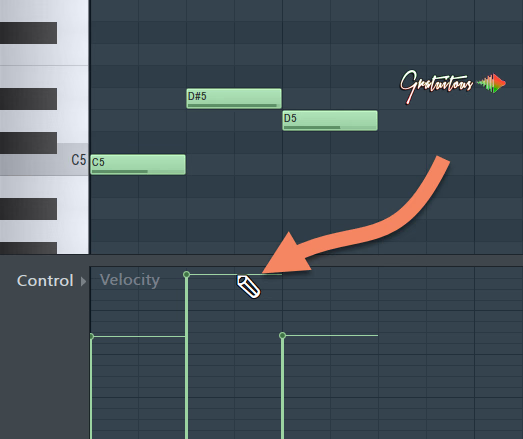
Turn down note with velocity instead of using compression or limiter with MIDI Note.

Using ADSR on Virtual Instruments for the EXACT Sound

Onto the next example..

Sometimes a sound can have way too long of a tail, like a PAD instrument..

Want to know the quickest way to fix this? Dial back the RELEASE KNOB!

Yes, it’s literally that simple, and such a pro-tip to MIX AS A PRODUCER without needing an extra plugin, and it actually fixes THE ROOT OF THE PROBLEM!

For a mixing engineer, they’d have to use a gate plugin to tame the tail (which is really hard to dial in nice).

Wrapping Up: Music Producers Full Control Compared to Mixing Engineers and Mastering Engineers

Mixing Engineers and Mastering Engineers are handcuffed because of the producer’s poor audio files.. but these audio engineers are extremely talented in working with what they’re given.

But, as a music producer, we have full control, and have the tools to fix the ROOT OF THE PROBLEM, without having to reach for plugins many times!

TAKE ADVANTAGE OF IT!

Do you have pro producer tips that mixing engineers and mastering engineers don’t have access to in your RAW MIDI Files?

Community

Questions about this episode

Transcript

S3E07 – Music Producers Have Full Control

  1. Season three, episode seven, Producers Have Full Control.
  2. As a music producer, we are special.
  3. And what I mean by that is we actually have full control over our music.
  4. When we look at mixing engineers and mastering engineers, they get the audio printed
  5. into audio files, which means that they're kind of handcuffed, but they are very
  6. good at using the audio tools to make those printed wave files sound really good.
  7. But we as the music producer, we actually are able to access our music at even
  8. a lower level than they are, which is MIDI M I D I.
  9. Very often, we as producers, we you know, we want to reach towards expensive plugins
  10. or even just even a basic plugin rather than just understand how we can fix
  11. something and keep it as simple as possible.
  12. For example, velocity on a single note to fix a loud note rather than grabbing a
  13. compressor. Also, behind the scenes, I have been working on beat tapes by Gratuitous
  14. Volume 10. It is almost ready for release.
  15. In the mastering stage here, I have been having a little bit of troubles on a couple
  16. tracks. Some of them are a little bit too spiky, in other words, the transients are
  17. kind of popping through a little harder.
  18. And even on the compressor I've been using, the Fab Filter Pro C2 compressor,
  19. there's a lot of different styles of compressors on there.
  20. And there was this one song where you know the the drums and the claps, they're just
  21. popping through too hard. And I've been very aggressive on the compression.
  22. I've tried lots and lots of look ahead, I've tried a fast attack, and I'm just not
  23. able to get it sitting where I want.
  24. So this made me start studying Pro C2 a little bit more, and as well, just in
  25. general, the styles of compressors.
  26. This is something that I have to learn much better because when we talk about
  27. compressors, there are actual use cases for compressors..
  28. It's not just slap a compressor on there and dial the knobs
  29. Each compressor does have its own use.
  30. All right. For example, if we want to control those transients, which is what I'm
  31. struggling with right now in this one of these tracks, the Fat Filter Pro C2 has the
  32. mastering style. And what it actually says in the manual is it clamps down on those
  33. transients fast but transparently.
  34. So in other words, it is helping to balance out the track.
  35. And so for the next little bit here, I'm just going to be practicing with different
  36. styles of compression, starting to learn them a lot more.
  37. And hopefully I can relate that information onto you once I learn it a little bit
  38. better. Before we get into this episode, again, don't forget about my free book.
  39. It's called Five Keys to a Successful Beat.
  40. So simple it becomes creative.
  41. If you sign up at it'sgratuitous.com forward slash five keys, you guys get a bunch
  42. of bonuses. So yes, you get the free ebook.
  43. It's a very in-depth e-book, reveals tons of secrets of what I wish I knew before I
  44. started becoming a music producer.
  45. You guys get some emails where I'm actually reading you the chapters because I know
  46. a lot of people don't like to read, but you will actually discover one of the
  47. principles in that book is you have to read to see success as a music producer.
  48. And there is a special presentation video about how I got started making beats.
  49. All right. You can get that by going to it'sgratuitous.com forward slash five keys.
  50. All right, so music producers have full control in their music.
  51. So let's just recap. So as a mixing engineer or as a mastering engineer, typically
  52. we are sending our audio files to them, but they are kind of handcuffed.
  53. In other words, what we send them is what they're stuck with.
  54. But like I said, they are very good at using EQ, compression, and various other
  55. mastering tools to make that audio sound very professional and very good..
  56. Okay But as a music producer, let's just talk about the most basic example
  57. here. Let's say we have a piano melody and one of our notes is just way too loud.
  58. Typically, when we watch in tutorials, we all think, oh, I'm gonna grab a compressor
  59. to reduce that loud note or a limiter, right?
  60. But the thing is, if you're a music producer and if you're making your custom
  61. melodies with your MIDI notes, you can easily just turn down the velocity of that
  62. one note. That way you don't need a compressor.
  63. So, in other words, it's easier on your CPU.
  64. Number two, you're not really affecting the sound because when we use a limiter or a
  65. compressor, it can kind of color the sound if we're not being careful with these
  66. tools. And the quickest way to do that would be just to adjust a single note's
  67. velocity. You just turn it down, problem solved.
  68. Then if you choose to use a compressor, then that one random note is not triggering
  69. the compressor really weird, and it doesn't sound as if like compression's happening
  70. because sometimes you know, in order to get a loud mix and master, or like I guess a
  71. loud master, you know, you are going to be having to use compression and distortion
  72. to get that loudness, all right.
  73. That's really like the secret to get a loud master is compression and distortion.
  74. Because what happens is when we have our music, we have all of our different
  75. instruments, and that instrument by itself can sound very beautiful, but once we
  76. start adding in other elements, different instruments and different sounds can get
  77. lost in the mix, and so you will find when you start using, you know, a little bit
  78. heavier compression, a little bit more distortion when you're mixing your music,
  79. when it comes to the mas mastertering.ing, you don't have to be as aggressive in,
  80. and you will be able to push your master a lot louder
  81. In other words, get a lot more balance, a lot more polished sounding.
  82. And typically it will also translate a lot better across different audio devices
  83. because a lot of times people are afraid to compress too hard or they're afraid to
  84. apply too much, right? But sometimes it's like you're actually not applying enough.
  85. And there is a sweet spot, obviously, and the whole goal is obviously translation.
  86. And that is what I'm going through right now on Beat Tapes by Gratuitous Volume 10.
  87. One last thing I'll say about music producers have full control is again.
  88. So, like let's say a mixing engineer or a mastering engineer, we send them the audio
  89. files and they email us back and they say, Hey, do you know what you're gonna have
  90. to remix this? You're gonna have to you know, turn down the snare, you're gonna have
  91. to do something. And this happens sometimes, like it goes back and forth because the
  92. mastering engineer obviously wants to give you the best product.
  93. And if you send them, you know, a horrible mix, then many times they might email you
  94. back and say, Hey, can you just send me a remix and that will give me something
  95. better to work with? And that might be like in an extreme case.
  96. But for me, I just like to mix and master in the same project.
  97. you have to make sure that your computer is powerful enough to do that.
  98. But if it is, I usually find this actually a faster workflow because all I have to
  99. do is open up one project, export it, and then I can test to my audio playlist.
  100. So, for example, let's say I was at the mastering stage and I'm starting to export
  101. all my songs that I'm wanting to test them in regards to how loud they are, how good
  102. like they kind of translate across different audio systems.
  103. Once I listen to it, I will then clone the project and I'll put V2 for
  104. version two.. And then I will again do another listen and then I will make notes of
  105. each song Maybe it's not loud enough, or maybe the kick drum is actually too loud or
  106. whatever. And then I might do a version three, export them, and then that is
  107. essentially like the finished product.
  108. Okay. So that's kind of how I have been working through this beat tape and in beat
  109. tapes by gratuitous volume 10.
  110. But what I'm trying to say is if I listen from one track to the next and I hear a
  111. significant difference, I can just open up that project, make a little tweak, export
  112. it, and then quickly go and listen once again.
  113. And I just find that gives me just a really really good workflow.
  114. Okay. All right, so that's this episode on music producers have full control.
  115. This is something I've really started to realize later on in my production career,
  116. that if you just want to fix something really, really simple, such as like a note
  117. being too loud, you can simply just go into your MIDI notes and turn down the
  118. velocity. It is so powerful once you realize that because that is the advantage that
  119. we as producers have because we have like the raw files, we have the raw MIDI notes.
  120. Whereas a mixing engineer would have to maybe do volume automation there, right?
  121. They might turn down the note, but the thing is it's still printed, so they're still
  122. stuck with what we give them. But like I said, they are very good at using these
  123. audio tools to make the music sound very professional.
  124. Again, don't forget you as the music producer have full control of your music and
  125. take advantage of it. Be on the lookout for beat tapes by Gratuitous Volume 10.
  126. I've been having a lot of fun working on it this time around.
  127. I took a little break from music and I got back in.
  128. hopefully ready to release this one very soon.
  129. When it comes to the beat tapes, like I have tons of beats or like tons of ideas,
  130. but the hardest part of putting together these beat tapes, first of all, selecting
  131. the ones I want, and honestly, probably the hardest part of putting together the
  132. beat tape is the arrangement stage.
  133. I find that the most tiring because you have to keep listening over and over and
  134. over. And don't forget about my free book I have for you.
  135. It's called Five Keys to a Successful Beat.
  136. So simple, it becomes creative.
  137. You can get it by going to it'sgratuitous.com forward slash five keys.
  138. You will get the ebook, which has tons and tons of secrets of what I wish I knew
  139. before becoming a music producer.
  140. In that book, there is my seven core principles of becoming a music producer as well
  141. as the five keys to a successful beat.
  142. So there's a lot of good information in there.
  143. And now if you sign up, you also get free videos, which I am actually reading to you
  144. chapters of the book and explaining it to you.
  145. There's also a free presentation.
  146. The presentation is a little bit long, but it's my story of how I started making
  147. beats. And if you want to get up and running, how I can help you.
  148. And you will also get special pricing to the platform to access the 30 FL Studio
  149. courses by going to it'sgratuitous.com forward slash five keys.
  150. All right. I hope you enjoy the free book.
  151. Always feel free to reach out, and I'll talk to you in the next episode.
GratuiTous Radio Start free Join Membership 0:00/0:00