
Spend $50, get $25 OFF — applied automatically.
Skip to Content Skip to Navigation Skip to Footer
Join Membership
Season 3 ·

S3E16 – How to Get Music On Spotify (Online Music Distribution)

0:00 / 0:00
This media could not be played.

Never Miss an Episode

Get new podcast episodes delivered to your inbox.

Home/Podcast/S3E16 – How to Get Music...

This post contains affiliate links – Read affiliate disclaimer

In this episode, I talk to you about how to upload your music to Spotify through Online Music Distribution, with DistroKid.

GET A DISCOUNT AT DISTROKID WITH THIS LINK >>

In order to submit your music to Apple Music, Spotify, and other music streaming services, the process is called Digital Distribution.

We need to use a Music Distributor who submits our music to the various music streaming platforms, such as Spotify, Apple Music, Amazon Music, Tidal.. and any new music streaming service that pops up later on (as there as way too many to choose from).

How to Choose an Online Music Distributor

Just like there’s so many choices of where to listen to music, there’s so many Music Distributors.. making you wonder What is the Best Online Music Distributor?

Choosing the Best Music Distributor is tricky because they have pros and cons.. like some charge a one-time payment and a small commission from any sales and royalties.. or some music distribution companies charge a yearly fee and take 0% commission.

My recommendation for how to select a music distributor is to understand your needs as a music artist or producer.

Music Distribution Features:

Do you work with other artists (known as collaborating) ?

If so.. you’ll want to make sure your Music Distributor allows for commission splits, which is an easy way to share royalties from music you collaborated on. (It can also help to have this third-party evidence of proof of earnings so that no one thinks they are getting cheated).

How to Prepare for Online Music Distribution

You should definitely take my Music Distribution Course. I break all this down step-by-step in very helpful videos.. I’ve released over 14 album releases of my own, and am very organized in my uploading approach in regards to album artwork, mastered music, setting up a tracklist, etc.

Here’s a list of what you need to submit your music:

  • Album Artwork (Perfectly Square, and at 3000×3000)
  • Your Album TRACKLIST (The Order Your Songs are In)
  • Mastered .WAV Audio Files (For the Best Music Quality)

The music distribution process is pretty straightforward, but if you want to become a good producer, it’s all about consistency in your branding.. so make sure to follow all rules, such as no websites or social names in your artwork..

Example of Music Distribution Artwork
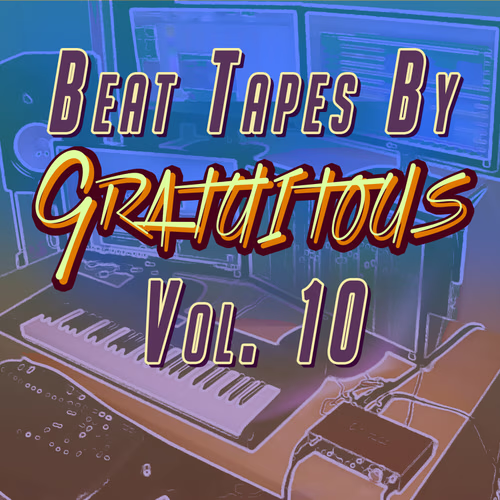
BEAT TAPES By GratuiTous Vol. 10
BEAT TAPES By GratuiTous Vol. 10 Artwork
This is the album I use in Online Music Distribution Course, where I show how to upload music to DistroKid video tutorial.

You also want to make sure your mastered music is all at a similar volume when it comes to your loudness meter, otherwise the listener will get a bad experience by having to adjust volume when a song changes.

Your album tracklist is really important to setup BEFORE you submit your music to Spotify with Digital Distribution, because you need to know this order as you upload your music..

Again, I share this step-by-step in my Online Music Distribution Course.
Online Music Distribution Course (Digital Music Distribution Course) - How to Get Your Music on Spotify, Apple Music, and Amazon Music

I share what album artwork should look like, and how to upload music to DistroKid to get music on music streaming services like Spotify, Apple Music, and more.

What’s the Best Online Music Distributor?

There’s really no “best music distributor”.. it’s most important to know what you need out of an online music distributor.

I typically just release my own music and own 100% copyright, so things are easy on my end.

DistroKid has been the best music distributor I’ve used over my years. The company is affordable, has a great feature set, and is usually the first to adopt new technology, which is pretty important in the music streaming service world, where music listeners always want the newest technology.

Try My DistroKid VIP Link and Save Money on Sign-Up!

Should You Use a FREE or Paid Music Distributor?

Free Music Distributors are becoming common for music submission. The idea of free sounds awesome because you don’t have to pay anything.. at least up front.

I personally think this business model works well if a free music distributor charges no upfront cost, and takes a 10-15% comission.

It would be nice if that same company then offered a paid plan.. whether that’s a one-time fee to digitally submit your music, or an on-going yearly fee, where they take 0% commissions from your music royalties.

If you do select a free music distribution option, I would be cautious and read reviews, as sometimes your music can be taken down, causing MORE WORK for you later on, because you opted-in for the cheap music distribution option.

In my experience, DistroKid is affordable, and while they charge a fee, this revenue will hopefully fuel the company in the long-run.. they’ve provided me with quick email support, too.

I hope you enjoyed this episode. Contact GratuiTous for any beatmaking questions!

Community

Questions about this episode

Transcript

S3E16 – How to Get Music On Spotify (Online Music Distribution)

  1. Season three, episode 16, how to get your music on Spotify,
  2. Apple Music, Amazon Music, any of these audio streaming websites where you want
  3. to submit your music, you want to get your music on there for people to listen nice
  4. and easy. That is what we will talk about in this episode.
  5. Alright, before we get into this episode, I have been working on the new course.
  6. It's called Sound Selection for Beatmakers.
  7. It's actually currently being exported.
  8. So usually when I make my courses, I first have to prepare the course, the actual
  9. lessons, what order I'm going to put them in.
  10. I have to actually record myself, then I have to edit those videos.
  11. That takes the most time because I'm really trying to make it so that it's quick to
  12. the point and you're getting the best education.
  13. Then the last step of that process is exporting it.
  14. But I myself make sure to watch the course from beginning to end.
  15. That way I'm kind of doing quality control in case any of the audio was weird, or if
  16. the course just is not flowing the way I like.
  17. So again, that one is called Sound Selection for Beats, and it's going to be a new
  18. course coming into the platform at it'sgratuitous.com very soon.
  19. Alright, so let's get into this episode.
  20. So if you have been listening now and been on the email list, you know that I just
  21. released the online music distribution course, which is teaching you how to get your
  22. music on Spotify. And again, if you want to check out the course, it is there
  23. available to you either as a download or you can join the membership to watch online
  24. music distribution course over at it'sgratuitous.com.
  25. Alright, so let's start with how do you get your music on Spotify and Apple Music?
  26. And essentially these are called streaming platforms, and we need to have a
  27. middleman where we submit our music and they distribute it on our behalf.
  28. So distribution means that we are sending it on various platforms that will play our
  29. music. So, in order to do that, we need an online music distributor.
  30. And it's really annoying actually nowadays because there is so many companies that
  31. are doing this. And if you read online, you will see how many online music
  32. distributors there are. Some are free, some are paid, some take different commission
  33. depending on if you pay, let's say $49 for an album release.
  34. Some of them take maybe you know 10% commission, some of them you pay a yearly
  35. ongoing fee and they take zero percent commission.
  36. So, first you want to select a music distributor.
  37. At the moment, I'm using DistroKid as my online music distributor.
  38. I am not recommending them because the thing is companies always change.
  39. So if you're listening to this five years from now, I can't tell you if it's going
  40. to be the same company in the same model and all that stuff.
  41. But I've been using DistroKid for quite a few years now, and they have done me
  42. really really good. At the moment, DistroKid just charges a yearly fee and they take
  43. zero percent commission and they make the process super easy.
  44. So in the online music distribution course, I teach you with distrokid how to upload
  45. your music, but you can follow along with any online music distributor.
  46. Okay. So first you have to figure out an online music distributor.
  47. There are free ones, there are paid ones.
  48. The free ones, just be a little bit careful, make sure to read reviews and all that
  49. stuff. If you just want a nice, easy solution, I would look towards distrokid.
  50. I have had an amazing experience with them.
  51. For myself, I release albums with lyrics as well as I release just instrumental beat
  52. tapes. I have not worked with other artists in a sense of splits and commissions and
  53. stuff like that. that, so I cannot speak on behalf
  54. But just as a solo producer doing my own thing, always owning 100% copyright,
  55. DistroKid has been super enjoyable and easy.
  56. Alright, so that's step one. You got to select an online music distributor.
  57. Again, you are going to find a lot of information out there.
  58. Everyone is just essentially listing pros and cons.
  59. Honestly, DistroKid, super easy.
  60. Okay. The next thing is you have to prepare your artwork.
  61. Now, if you type into Google DistroKid Artwork specifications or rules, you know, so
  62. DistroKid Artwork Rules, it's going to tell you what size of artwork and do's and
  63. don'ts of your artwork. So they are saying 3,000 by 3,000 in your artwork.
  64. It has to be perfectly square.
  65. And in addition to that, there's some things that you should not be putting in your
  66. artwork, things like website links such as www.yourwebsite.com.
  67. You should not have social names in there, you know, like your Twitter name and no
  68. profanity, no vulgar stuff, no nudity, stuff like that.
  69. Okay. Again, I'd highly recommend searching that into Google and reading that before
  70. you actually create your artwork.
  71. And one thing I just want to say there is when you create your artwork, you can do
  72. it yourself if you know how to do it.
  73. But sometimes it's nice to hire someone out, someone who is really truly
  74. professional, because your artwork is a part of your product.
  75. A lot of people don't realize that your music is a product, it's no different than
  76. an ebook or a course. For example, if you visit it'sgratuitous.com, you'll see my
  77. beat making books there. You'll see my FL Studio beatmaking courses.
  78. That is a product. It's no different than creating a song to sell.
  79. If someone looks at your artwork, that could potentially make them think, hey, I
  80. want to check out that song because of the artwork alone.
  81. All right. So that is artwork.
  82. Make sure to read DistroKid's do's and don'ts because things can change over time.
  83. All right. But in short, 3,000 by 3,000, make it look attractive.
  84. Do not put websites, social names, nudity, any of that kind of stuff into the
  85. artwork. The next thing that I highly recommend you do is prepare a track list for
  86. the release. So make sure you have that in order.
  87. What I do is I create a text file on the computer and I order the tracks in the
  88. order that I want the album to be.
  89. So let's say my recent beat tapes by Gratuitous Volume 10, it had 10 beats on it.
  90. I made sure to create the track list, which is the order that the beats go in.
  91. So it goes from one beat to the next.
  92. You want to make sure you have that track list because when you go to upload your
  93. music, you know the exact order that your music is in and you're not figuring it out
  94. while you're uploading. Also, for the songs, which we'll talk about in a second, you
  95. want to make sure that the fade out times of each song make sense.
  96. Because when you work on just a single track, you just export it, you're good to go.
  97. You're not really so concerned with the fade out time.
  98. When you're working on an album, the fadeout time is important because it goes from
  99. one song to the next. When it goes to the next song, if your fade out is too short,
  100. it's gonna sound rushed and it's gonna sound really weird.
  101. If it's too long, again, it's gonna sound weird.
  102. So you want to get that sweet spot.
  103. And again, so that's your fade outs.
  104. All right, so so far, I've told you that you want to select an online music
  105. distributor. I am currently saying that DistroKid has given me a really good
  106. experience.. You want to make sure your artwork is ready
  107. You want to make sure you have that track list, which is the order the songs are in
  108. with good fade out times. You can also be thinking about the intro as well.
  109. Fade out times, I think are even a little bit more important when it transitions
  110. from one song to the next. Now the next thing is exporting the music.
  111. So you want to be exporting in Wave.
  112. Right here, there's gonna be a lot of preferences for different people of what they
  113. want to do. In my opinion, I keep it simple 16-bit, 44.1
  114. kilohertz, and you're good to go.
  115. All right. Make sure in that master that you are mastering at a sweet spot for your
  116. volume. And if you want to learn more about that, I teach you that in the online
  117. music distribution course. I give you an example of one of my mastered beats, and
  118. you can see exactly how it was mastered, the volume I am mastering it at.
  119. So you want to kind of get a sweet spot for your master, and the whole trick of
  120. mastering an album is making sure from one song to the next that they are very
  121. similar in volume so that the user, someone who's listening to your music, does not
  122. have to keep adjusting their volume.
  123. They can just listen from one song to the next and they get a good experience.
  124. Okay. Some people out there will say export at 24-bit and a higher sample rate, but
  125. at the end of the day, you are submitting it to an online music distributor, such as
  126. DistroKid, then they are sending it to the streaming platforms such as like Apple
  127. Music, Amazon Music, Spotify, and each of these audio streaming
  128. services, they do their own audio conversion because they do not play the music as
  129. the WAV file because a WAV file, let's say for your beat, let's say it's 50
  130. megabytes, that is large in terms of a file.
  131. a And so if someone's at the gym streaming your music, a 50 megabyte file
  132. is way bigger than let's say five megabyte file, which is what they do.
  133. They take the WAV file, they compress it into a different format, such as
  134. MP3 or whatever compressed audio file format they are streaming at,
  135. so that the user does not use as much bandwidth.
  136. Most people really can't hear a difference in the audio quality, anyways, and they
  137. make sure it's at least at a decent audio quality where you're not really gonna hear
  138. too much of a difference. All right, so again, we are exporting at WAVE 16-bit 44.1.
  139. These are high quality audio files that we are using for distribution.
  140. Now, a cool pro tip I teach you in the online music distribution course is you also
  141. want to be exporting MP3s, and FL Studio makes this really really easy.
  142. You can just click WAVE and MP3 at the same time, and it will literally export both
  143. for you. But in the MP3s, you want to make sure that you prepare those MP3s with a
  144. software called MP3 Tag. Again, I teach you that in the online music distribution
  145. course about how to get artwork into your MP3, how to make sure you have the proper
  146. titles, the artist name, and why that's so powerful is because when we send music
  147. over email, for example, if you're talking with different people and you want to
  148. share your your music, all of the information could be in that MP3.
  149. If someone listens to it on their phone or in their car, it shows the artwork, the
  150. song title, and it's all really, really professional.
  151. Okay. All right, so that is it for this episode.
  152. That is how to prepare your music for online distribution.
  153. You select an online music distributor, you make sure your artwork is ready, you
  154. make sure you have that. track list, which is the songs in order
  155. You make sure that you are exporting high quality audio in Wave 16-bit 44.1.
  156. You want to master in that sweet spot.
  157. Again, you can learn more with the online music distribution course for an example.
  158. And then I also show you a bonus about preparing the MP3s as well.
  159. Typically, you will be sending MP3 over email, okay?
  160. All right. So again, be on the lookout for the sound selection in beats course.
  161. I'm currently working on that right now.
  162. And if you guys would like to learn FL Studio, you guys can join the membership over
  163. at it'sgratuitous.com. You can access 31 beat making courses.
  164. There is so much information in there if you're wanting to learn drum loops, the
  165. piano, if you're just brand new, you guys can start with what I call the course
  166. pathways page. You guys can find that on the website.
  167. You simply just watch the courses in order, and you guys get straight to the point
  168. training. Really enjoyable. There's been a lot of good results from students.
  169. If you ever have questions, you can send me an email at high at it'sgratuitous.com.
  170. And if you'd like to learn step by step how to get your music onto Spotify, check
  171. out my online music distribution course.
  172. Again, it'll teach you about an online music distributor, the artwork, the track
  173. list, exporting Wave at high quality, as well as preparing that MP3 and a lot of
  174. other helpful tips. I show you step by step and I actually even upload the beat tape
  175. with you, showing a real example of how to do it.
  176. I'll talk to you in the next episode.
  177. Again, reach out anytime over at it'sgratuitous.com
GratuiTous Radio Start free Join Membership 0:00/0:00