Spend $50, get $25 OFF — applied automatically.
Skip to Content Skip to Navigation Skip to Footer
Join Membership
Season 2 ·

S2E03 – Taking Music Production Seriously
0:00 / 0:00
This media could not be played.

Never Miss an Episode

Get new podcast episodes delivered to your inbox.

Home/Podcast/S2E03 – Taking Music Production Seriously

Is making beats something you do for fun as a hobby, or is it something that you would like to make a career out of?

It’s important you decide early on in your music career, otherwise it will always fight you while you are at work.

If it’s for fun, keep it as such. If it’s for a career, you will need to start reading about online business, and learning the essentials required to have a long-term foot in the music industry (and online business industry).

I quickly talk to you about a really cool trick in FL Studio, that not many people know about, and it’s Spare State. It allows you to Store in spare state, then you can Flip with spare state. (This allows ANY PLUGIN to have A/B comparison for powerful mixing!!!)
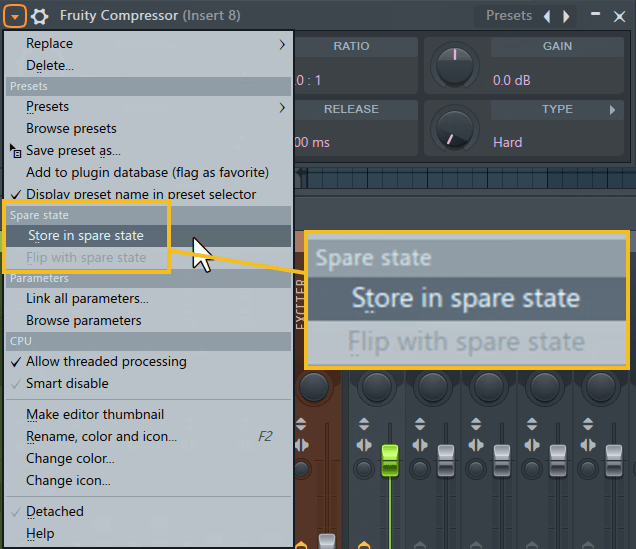
Spare state feature of the FL Wrapper. Any plugin has this, but it is most effective with a plugin like a compressor or EQ (with fair volume comparison) to hear two different tweaks you’ve applied.

I talk a lot about A/B comparison throughout my blog, podcast, and courses.

This allows you to switch back and forth between changes you’ve applied on EQ or Compression, and can really help you nail in the proper settings. (And I even mention in the episode that A/B gives you two options, but you actually have a third option, which is OFF/ON.. OFF/ON is like the BEFORE, then you have Version 1 which is A, then Version 2 which is B).

So, if you use a plugin in FL Studio that does not have A/B, now you can use this trick!

You will also hear my interview I had with James, a member who was so happy he found my beatmaker training platform. The interview is available on video as well here.

I hope you enjoy the interview, and the A/B tip.

I plan to start recording this 5 GOLDEN PILLARS OF MUSIC PRODUCTION course very soon, and it will be added to the platform of my other FL Studio courses.

Stay tuned!

Community

Questions about this episode

Transcript

S2E03 – Taking Music Production Seriously

  1. Season two, episode three, taking music production seriously.
  2. In this episode, I'm gonna be giving you guys an interview, which I had on YouTube.
  3. You can watch it. I'll leave the link there if you want to watch the video.
  4. But this is just gonna be the audio.
  5. There's a lot of good content in here.
  6. I interviewed his name is James.
  7. He became a member of my beatmaker trainer platform.
  8. He has so many good things to say.
  9. And one thing he told me is he said, let everyone know the huge benefit of learning
  10. from one or two really knowledgeable producers instead of searching endlessly on
  11. YouTube. Learning just on YouTube can be like trying to build and solve a puzzle.
  12. You can probably find most of the pieces to the puzzle, but there's no order,
  13. direction, or real structure on how to put the pieces together to where you end up
  14. more confused than when you started.
  15. All right. So that is what James said.
  16. Before we get into the interview though, I want to share with you guys a really cool
  17. tip. A lot of you guys may not know this, but I always talk about A and B.
  18. Okay. It's one of my five golden pillars of music production that will be a course
  19. coming out soon to the platform.
  20. And these are five extremely valuable things to know when you're making beats.
  21. You know, you always need to know these things, and one of them is A and B
  22. comparison. If you've never heard about this, it's always important to be able to
  23. quickly switch in between two styles of whatever you're trying to do.
  24. For example, if you're trying to EQ a sound, most EQs have before
  25. and after, or like an A and a B.
  26. Now, the most important thing to do when you are using A and B comparison is that
  27. the levels are very similar. Because if they're not, it's not a fair comparison, and
  28. you're gonna be skewed towards the louder one.
  29. That's just what we have learned over the years of music production.
  30. I want to say one more thing about that: is when you have A and B, but you also have
  31. off and on. Okay, so you really have like three states: you have before, and then
  32. you have version A and then version B.
  33. So FL Studio allows you to do this in every single plugin..
  34. Okay, a lot of people don't know this
  35. Every single plugin has the wrapper.
  36. So you click in the top left and you're gonna see spare state.
  37. So what you can do is you first have to store it in a spare state, which is now it
  38. becomes A, and then you can flip it.
  39. So now you can flip the state, which is like going to B.
  40. Now, personally, I wouldn't be using this on things like synths.
  41. This is more for like effects such as like compressors, EQs.
  42. That's where you're really gonna get the most benefit of this, right?
  43. So, for example, let's say on a compressor, let's say you want to be really
  44. aggressive, but maybe you want to go a low threshold, so let's say minus 30, and
  45. then maybe you want to go like a lighter ratio, so let's say 1.5 to one ratio, and
  46. then maybe you can adjust your attack and release.
  47. Then let's say on state B, you can maybe bring that threshold up to maybe like minus
  48. 20, but be a bit more aggressive on the ratio, and then again play with your attack
  49. and release. Again, making sure that the volume is similar when you flip in between
  50. before and after, and then in the case of FL Studio, it's just the flip with state.
  51. You can easily compare what you like better with those compressor settings.
  52. Now, the better plugins out there very often have this built into the plugin, and
  53. it's really quick. It's just a matter of just one click, you're good to go.
  54. But for plugins that do not offer this, you can easily switch the state.
  55. I do know that the Fruity Limiter does have A and B built in, but the Fruity
  56. compressor is kind of more of a basic compressor, but you can still switch in
  57. between A and B. Okay, so there you guys go.
  58. Again, here is the interview. I hope you guys enjoy..
  59. And again, if you want to join the Beatmaker Trainer platform, right now I have 26
  60. FL Studio courses in there Just go to it'sgratuitous.com forward slash courses, or
  61. if you want special pricing, you can get my free book.
  62. Just go to it's gratuitous.com forward slash five keys.
  63. All right. So, James, so thank you so much for taking your time out today.
  64. So thanks for having me. So you have been enrolled since I have July 15th,
  65. 2021. That's when you joined the platform.
  66. Right. And how how are you enjoying it so far?
  67. it's it's amazing, actually. I'm just completely blown
  68. away by the detail. the workflow of the detail, and all the
  69. different little aspects of the music industry that mostly everyone else I talked
  70. about does not bring up at all.
  71. blown away was not just not just the simplicity of doing
  72. FL Studio, but also at the same time just the the heads
  73. up of different things in the music industry and the music production folder thing
  74. completely changed everything for me.
  75. For example, I'm still working on that because during one of your
  76. podcasts on Spotify, you talked about gear lust, and I
  77. was in the middle of that. I was just getting free VSTs, free sample.
  78. It didn't matter what it was. Like as many different sounds as I could get, I was
  79. getting. Then I realized that after you said that, I looked. at all of my
  80. sounds, and I'm like, I have more stuff than I'll ever know what to do with
  81. And it would take me years just to hear every sound, much less make a determination
  82. on whether I want to use them or not.
  83. The production folder, though, mine was really, really messed up.
  84. And that saved me a lot. But from every other video
  85. and any other tutorials I've seen, you just
  86. nail it when it comes to explaining things, especially when it comes to the
  87. detail, the the the what, the how, the why, which is a huge one,
  88. and then the when and where and all that other stuff.
  89. So let's just recap a little bit of what you said.
  90. So the music folder, the music folder, like I that's taken me a lot of years to
  91. figure out and learn. And I just pass it on to you guys because it's all about
  92. organization, about backing up, and then in the long run, if you have to switch
  93. computers, it makes it really easy as well.
  94. but then again, the organization, right?
  95. So that's like one of the number one secrets as a music producer is being organized,
  96. and it allows you just to flow faster.
  97. And then you talked about the gear lust, all the you know, all the instruments, all
  98. the tools. Nowadays there is way more tools than ever.
  99. Like when I started, there was a lot of tools, and now it's like, you know, there's
  100. so many. So the whole goal is to find out the tools that work for you, learn them,
  101. and then you become a lot better.
  102. And and that's yeah, that that that's awesome that you're that you're enjoying it.
  103. So yeah, you can log in, you watch the courses, it's easy to track your progress,
  104. and you just take your your time at it, right?
  105. Yeah, like I'm learning the the piano.
  106. Nice. I've been playing guitar for 20 something years.
  107. The biggest problem I had in the beginning was really just what fingers did what.
  108. I was so used to the white keys that I got it's
  109. different on guitar, but on on the keys, why does this not sound right?
  110. Well, I'm using the C major scale and trying to use a black key, you know.
  111. That's a very popular course of yours, and I can see why now.
  112. The safe spots is a great one.
  113. Drums have always been a weak spot.
  114. And the safe spots have shown me things that I never knew before.
  115. Like I didn't know that every single button on the channel rack was a 16th note
  116. until I heard from you. that just totally answered a lot of questions
  117. right there. The way that you build your beat on
  118. a pattern, and then you copy certain parts and then paste to other
  119. patterns. Definitely is way faster than anything I've
  120. learned seen, heard learned before.
  121. Because you you know, you can get the whole drop basically, and then you can
  122. separate it after you're done.
  123. I didn't even think that was possible.
  124. I thought you had to do it, you know.
  125. These little things that like FL doesn't push, or a lot of these other people that
  126. teach you don't push, you wouldn't even know existed.
  127. Like it the little things like that you bring up.
  128. I don't know anyone else that talks about drums in the way that you do to where
  129. everyone can understand it. Like that part just has me blown
  130. away. And as as well understanding that every instrument that you do,
  131. you need to be aware of the frequency spectrum, which is something I never thought
  132. about. So I'd have a lot of clashing and not really realize it.
  133. And then after listening to that, I go take a look at span, something like that, and
  134. then I can totally see what you're talking about.
  135. Yeah. So that that part absolutely blew me away.
  136. The number pad that that is no one's talked about the number pad.
  137. I've never heard anyone talk about it.
  138. No, man, it's amazing, isn't it?
  139. It's way faster. Yeah, absolutely faster.
  140. the the template idea. I had built this gargantuant template that had every
  141. effect, every like the channel rack was already at
  142. 20 with just drums, and then these plug-in, like everything I thought of I could
  143. ever imagine needing, I wanted in one template.
  144. And then I realized after you explaining it, that really slows things down
  145. in a lot of cases, right? Some other things that that you have said that have really
  146. opened my eyes is the overall different roles that a person can
  147. have in music. There's so many different avenues that it's not all or nothing, and
  148. that's something that my mind did have for over a decade.
  149. I was in the retail world because I thought I had no chance, but I didn't realize
  150. the different avenues of opportunity.
  151. Just the other, just the whole parts of the industry, the things about the the taxes
  152. and the you know, just different roles and what to think about, and when you're
  153. buying certain year, you know, like I was thinking get something for today, but
  154. or get the cheapest this or that.
  155. But listening to you when it comes to quality and explaining things, a lot of it
  156. made sense, especially like sample packs, construction kits.
  157. That was one thing I was totally initially liking, and then when you
  158. explained about construction kits, it made sense.
  159. I'm like, why would I pay for you know, all I'm doing is it's basically kind of like
  160. a musical small puzzle. You just put the pieces together and that's it.
  161. It's not really art. I mean, it I guess it helps you in the beginning when you need
  162. to learn how to arrange, but then again, at the same time, it doesn't teach that
  163. either. So yeah, like you you're using someone else's music to call to call your
  164. own, which isn't your own. Yeah, and and the the just certain
  165. life tips, like don't just throw out music so early, you know.
  166. Oh, you know, I I wrote this song that sounds so cool at this very moment, I must
  167. put it on YouTube, and then you know not it could be the next day, but even
  168. a year from now, you'd be like, Oh, yeah, that was me during a
  169. troubling time, you know. And I think about certain
  170. groups, like the first one that pops my mind right now is Van Halen.
  171. Did Van Halen release music when they were just learning?
  172. You know, they were totally ready to destroy, you know, the industry that they were
  173. in. You even taught. things like how to Google
  174. I mean, no other music producer said anything about how to look for something.
  175. You know, they'll tell you what they think they want you or what they say that you
  176. should learn, but you're like, no.
  177. This is how you learn what you want to learn, and that just
  178. there's not very much of there's very little of
  179. showing any evidence of you just doing this for any other reason than just to help
  180. the other person, and that's something I don't see ever
  181. really. And there's a lot. There are a lot of videos, a lot of people that
  182. make videos, a lot of good ones, but I think everything
  183. that a single person needs for making beats, writing music, their
  184. brand, all the different avenues, there's just one spot, I think, which
  185. is your website. there's I don't think there's
  186. a simpler way. I just don't. I'm never trying to talk from the perspective that like
  187. I'm an expert. I'm just talking from the perspective that, like, hey, I was just
  188. like all you guys trying to learn all this.
  189. I found all these different tutorials, I've read books, whatever, and I figured out
  190. like this is how I like to use this tool, and I'm just passing on this information
  191. that I've learned over the years on to you guys.
  192. You know, like when it comes to mixing with EQ, like, you know, it's not to say that
  193. these are the best decisions, but this is how you can use this tool to get decent
  194. results. Yeah, the one thing that separates you from anyone else's is
  195. you will say ever.y tool, every way of doing this
  196. you'll show a thousand different ways to do something, all the different
  197. possibilities. And from what I've gathered from other teachers, what they do is
  198. is they just teach you the part of FL that works for them.
  199. I feel that you will explain what works for you, but you'll explain other things
  200. that you'll even admit you don't use, like what was it?
  201. The pattern one of the pattern pickers, I think that that FL recently did, but
  202. then you still explain that it's there and you could use it, which no one else
  203. does. If they don't believe in it, then you're not gonna hear about it.
  204. And that's something you do do, like whether you like it or not, you will explain
  205. every little part, and then you explain why.
  206. Then you'll explain why you don't like doing it.
  207. Yeah, right, right. At least we know, yeah.
  208. And again, it's all just my own personal opinion.
  209. Like, you you make your decision, you know.
  210. Yeah, and again, you you explain things in a way that I'm just not used to.
  211. someone explaining it so well.
  212. Awesome, man. Thank you so much.
  213. even hearing you explain that or saying that you you want to learn more about
  214. something, just I would never know prior.
  215. I think you knew all of it. No, no, man.
  216. I was I'm just like you guys. I found out about FL Studio, downloaded the trial
  217. version after about like a month of the trial version.
  218. I was just like, I'm just gonna do it, right?
  219. Take the leap, buy the sick. I bought the signature edition, and it was just like,
  220. what did I just do? I bought this music program.
  221. It was like 300 bucks or whatever.
  222. but lifetime updates, and just kept practicing and practicing.
  223. And one year goes by, two years goes by, different life things start happening,
  224. right? But the thing is you got to keep with it just because you're not making
  225. music, like you want to keep you know, moving forward somehow in that direction,
  226. right? And see, that part right there is very important because for the last week
  227. and a half, musically, I haven't written much.
  228. I've been spending time organizing the music production folder, yep, getting another
  229. hard drive, learning the learning the finger placement.
  230. So, like there's a lot of like half of my brain's like, you haven't done anything,
  231. you haven't written anything. But at the same time, I'm learning, you know, and and
  232. organizing setting it up for the moment of the workflow that
  233. you want to have achieved that I still am working on.
  234. So it was a pain realizing how bad I messed
  235. up music production folder, how I just had VSTs everywhere, you know.
  236. I mean, and it's good now, but when I realized that that moment
  237. wasn't a very fun moment, but it needed to be done, and now it's a lot better.
  238. But the the thing you have to understand is when someone listens to the music, well,
  239. they're just listening to the music, but they have no idea the effort and the work
  240. that you've put in behind the scenes to learn how to make that beat, right?
  241. Everything from knowing the notes, learning about your VSTs, your sounds.
  242. So, you know, you just made the beat.
  243. Well, awesome. Well, now what about arrangement?
  244. What about song structure? What about the mixing?
  245. What about the mastering? What about the branding?
  246. What about the right? All that's everything.
  247. It all goes in. And someone who's on Spotify, who's just a listener, they know
  248. nothing about a music program at all.
  249. They listen to your song and they have no idea how much effort that you put in.
  250. So what I'm trying to say is when you're talking about organization, when you're
  251. talking about learning about your your keys, all that stuff is about is a it's it's
  252. a part of being a music producer.
  253. And organization is like number one, right?
  254. Like if you if you start doing well, you want to know where all your music files
  255. are. If someone emails you, you can easily send it off so that you're not spending
  256. like the whole day figuring out how things work.
  257. It can literally take you five minutes and then you go on to do something else now.
  258. Yeah, it it happened. After you explained it, I started moving things around.
  259. And then actually prior to you explaining it, I was open up projects, seeing the
  260. old boxes. Over and over
  261. again, and going back trying to figure out what's going on since I learned the music
  262. production folder from you. I've not had that problem once.
  263. I guess the part I'm trying to figure out is this how simple can I make this folder
  264. when I have all these samples?
  265. Or do I want to make it as detailed as possible?
  266. Like these are just sticks, these are just shakers, these are just metallic
  267. sounds, or do you want to just have a percussion, which you know, like sometimes
  268. I think I made it to where it's so individualized that it's too much.
  269. Yeah, it makes it harder. Yeah.
  270. So the m and the way how I do it is I just organize sounds by vendor.
  271. So, for example, I like to use the exclusive audio drums a lot..
  272. So in this so if I buy sounds by exclusive audio, I create one folder, exclusive
  273. audio If there's other, you know, like let's say they release a new sound kit, I
  274. literally just drop that sound kit into the exclusive audio.
  275. And then they organize it for you, right?
  276. Drums, claps, snares, hi hats, it's it's all in there.
  277. And so I don't really worry so much about like, oh, like there's hi-hats from all
  278. these different sound packs. I don't combine them, I leave them in that's what I was
  279. doing, yeah. Yeah, yeah. No, because that way I know that that's all a part of that
  280. kit. And then when you work on the individual song, you can export the project data
  281. files. And then I do that for all my serious songs because in case somehow I ever
  282. lose my drum kit folder, the individual song still has all the the one
  283. shot drum samples. Yeah, and that changed a lot for me.
  284. A lot of projects I say because of that, because I just thought you just did an SLP.
  285. And you know, I mean, I know technology is amazing, but I was putting a little too
  286. much trust in it, to be honest with you.
  287. I had a lot of times where it couldn't find a sample, and we're just like, what are
  288. you talking about? But ever since I do it the exact way you set it up, it's all
  289. there. And even if something happens with any situation, all the
  290. backups of the backups, the external backup, the cloud backup, the firebox
  291. backup, is things I never thought about.
  292. And it's like, dude, this is this could be your whole life, especially if you want
  293. to do it as a career. Exactly.
  294. Probably want it in a firebox.
  295. things that just no one really talks about in any type of tutorial.
  296. They tell you this is how to do this exact thing, and that's it.
  297. But you're like,ing. let me talk to you about your career, your actual life dur this
  298. And that's something that I you just don't see anywhere else.
  299. Makes so much. Makes all the difference.
  300. Mm-hmm. Yeah man. Like you get to see the full picture, right?
  301. Yeah. I've been through a lot of different, you know, I went through you know
  302. school, like high school, like you know, like everyone else, I went through
  303. electrical school, electrical school in Canada, the education, like you learned, but
  304. you for us you didn't learn hands on.
  305. It was all 100% theory. So like you know, pencil and paper, you go, you write a
  306. test, awesome, I passed your test, but I really still don't understand what I'm
  307. doing. And then they send you out onto the job site and it's just like okay I want
  308. you to go wire some plugs and wire some lights, whatever.
  309. And it's just like but how because yeah and and I try to do that with the way you
  310. teach music. So like you'll you'll do an example of something and I'm gonna like
  311. I'll we will copy him completely right now.
  312. But before I move to the next topic I have to erase everything and make my own
  313. version using the exact same method and then I will move to something else.
  314. And that's the part that drives me nuts is I want to be you know progress this far
  315. tomorrow. But you know if I just learn some if I learn a course
  316. you s you a a video you do once and don't go back with it I'm going
  317. I'll probably remember one out of five gems that are in that course.
  318. So the the old me would be let's see how fast I can pass
  319. or just complete all your courses and now it's totally different.
  320. It's like I want to get it right and so I guess for anyone who
  321. wants to know just stuff to where they can plop it in and
  322. brag then I I don't know there's a lot of stuff out there on YouTube
  323. but if you really want to know artistically and completely from a whole view of how
  324. to do this and actually succeed your courses are about as they
  325. are as good as they get and I haven't even crossed all the courses yet
  326. like I still want to there there's so many of your courses I haven't done like the
  327. advanced or the mixer I'm still on the beginner and the piano the piano part I
  328. really want to get down because that plays a huge role in this yeah the
  329. piano takes years but but it is it's the fact of understanding how it works once you
  330. learn how it works okay so now it start flowing and then you start getting better
  331. because again like you said the piano is a part of everything with beat making
  332. you're using all your your synths your VSTs right whether you're playing a guitar
  333. sound you're playing your keys whether you're actually playing a real piano sound
  334. you're still playing the keys baseline keys it's just about understanding that these
  335. notes go together you can't start adding different notes in because they
  336. mathematically do not work. Right.
  337. And that's it because because at the end of the day music's just math right it's
  338. frequencies. The final question is what advice do you have for someone starting up
  339. beat making in FL Studio I would I would
  340. honestly say to take your courses, and the reason why is because your course number
  341. four or five that I've taken since February, but you're the only course that made
  342. sense. I mean, they all made sense to a point, but if if you want to understand
  343. everything from the ground up, so you don't go forward just to take
  344. steps back to relearn what you should have, then you know
  345. they need to be taking your course.
  346. but understanding the computer you have and what you need before you even start
  347. is something that no one told me.
  348. In fact, actually, I bought FL Studio from a previous trainer
  349. that said I can teach NFL Studio, so I bought it, and come to find out
  350. he works with Logic Pro. He had FL Studio for like a few
  351. months, and you said all you need's software and a laptop,
  352. nothing about audio interface, microphones,
  353. needing, you know, the connections, the USB cables, but also you had a
  354. clip where you were doing things like showing all the little yeah, yeah, yeah.
  355. Yeah, the other audio pieces, the things you just don't think about until the moment
  356. where it happens and you don't have it, right?
  357. And then that's a horrible situation.
  358. You know, know your do learn what equipment you need before you start.
  359. Right. Because otherwise it's gonna be a lot of being
  360. aggravated over something that you didn't think about before.
  361. But I know in a lot of cases, even for me at some points, I've I kind of got to the
  362. point where I'm like, do I just give up?
  363. Like, how many things can go wrong before I finally just realize it?
  364. But what I didn't realize was is I wasn't prepared.
  365. I didn't look up the stuff that I need to know before doing it.
  366. I also talk about sticking inside of one DAW, right?
  367. Picking one music program and and sticking and sticking with it.
  368. And that's something you you got me into because I started with cakewalk because it
  369. was free. Okay. But then I got the free version of Pro Tools, FL Studio,
  370. Ableton, Q Base, but there's no point in me half or partially learning five
  371. different DAWs. I'm I'd rather just master FL because
  372. after just seeing what you've shown, it it has so many
  373. options and possibly anything I can think of I can do on there.
  374. Yeah, like at the end of the day, man, all these music programs essentially are
  375. doing the same thing. Some might do it a little easier, some might not be able to do
  376. that feature, but if not, many times there's a third-party plugin you can install.
  377. But FL Studio allows you, like at the end of the day for us, like what I'm wanting
  378. to do is I'm willing to make beats.
  379. And FL Studio is amazing for making beats.
  380. Like, right? And so why am I why would why would I be trying to learn another music
  381. program if FL Studio can give me all that?
  382. Now, if I was heavily in the industry working with lots of different artists, and
  383. they're sending you stems and stuff that you know, or or like if they they send you
  384. a project or whatever, you know, maybe you want to learn maybe one other industry
  385. standard, you know, DAW, such as like Pro Tools.
  386. But besides that, like we're just making beats and we use MIDI.
  387. So MIDI, a lot of producers don't understand that MIDI is like the most powerful
  388. thing as beatmakers because when we play a note, after we're done recording, we can
  389. easily go back and edit the notes, right?
  390. Whereas if we're recording, like let's say a real guitar into a microphone, we're
  391. stuck with that audio. It's printed into an audio file.
  392. With MIDI, those are the notes, which means we can adjust their lengths, we can
  393. adjust the velocity. So when we talk about compression, right?
  394. Volume, so sometimes you don't even have to use compression.
  395. You can just use the velocity on your MIDI notes to get the balance you're
  396. wanting. Things like that, really, really, really like the courses.
  397. I mean, that saved me I don't know how many more hours of me trial and erroring when
  398. it was something as simple as volume.
  399. I mean, you know, people keep wanting to push all these special things, and it could
  400. be just something as simple as that.
  401. Hey Gratuitous here. I hope you enjoyed the content.
  402. If you want to become a better producer, then check out my podcast called Music
  403. Production Made Simple. It's totally free and available wherever you listen to
  404. podcasts. I also run a beatmaker trainer platform.
  405. There's over 26 courses in there right now, all focused on FL Studio.
  406. It's helped a lot of students, and I'm sure you'll love it.
  407. For more information, just go to it's gratuitous.com forward slash courses.
  408. Finally, if you like to read, all of my books are now available in one bundle, such
  409. as audio painting about arrangement, safe spots about drum loops, FL Studio
  410. Beginners book, which is going to teach you the basics, my template book to teach
  411. you about a fast workflow, as well as proper producer mindset to start your music
  412. production career right the first time.
  413. For more information on my book bundle, just go to it's gratuitous.com forward slash
  414. books. Thanks again for watching.
  415. Visit it's gratuitous.com for all your FL Studio training needs.
GratuiTous Radio Start free Join Membership 0:00/0:00