
Spend $50, get $25 OFF — applied automatically.
Skip to Content Skip to Navigation Skip to Footer
Join Membership
Season 2 ·

S2E15 – Getting Comfy + Healthy Work Environment

0:00 / 0:00
This media could not be played.

Never Miss an Episode

Get new podcast episodes delivered to your inbox.

Home/Podcast/S2E15 – Getting Comfy + Healthy...

This post contains affiliate links – Read affiliate disclaimer

This is an episode that I would really like you to listen closely.

DISCLAIMER: DO NOT TAKE MY ARTICLE AND EPISODE AS HEALTH ADVICE.. I AM NOT A DOCTOR.. SEEK YOUR OWN PROFESSIONAL HEALTH ADVICE FROM A QUALIFIED PROFESSIONAL.

Being an electrician for almost 10 years, I was surrounded by a much different work environment in terms of how to look after your body and keep yourself safe.

The word “safe” I am meaning to prevent injuries, and allow you to stay as productive as possible, while not noticing any downsides such as pain from overworking your body.

Within the studio environment, I have realized over the past couple years there are some main things you really want to look at to help keep your body at its peak performance. Some of these things require a larger purchase, but I talked about these things because I’ve tried to cheap out myself over the last 10 years.

What kind of things are we talking about in this episode?

Well, mainly our eyes, ears, backs, and being aware of bad posture and continual movements that encourage pain.

You will have to listen to the episode to hear many of the things I’ve learned, which I’m hoping will help you prevent the same things that have happened to me.

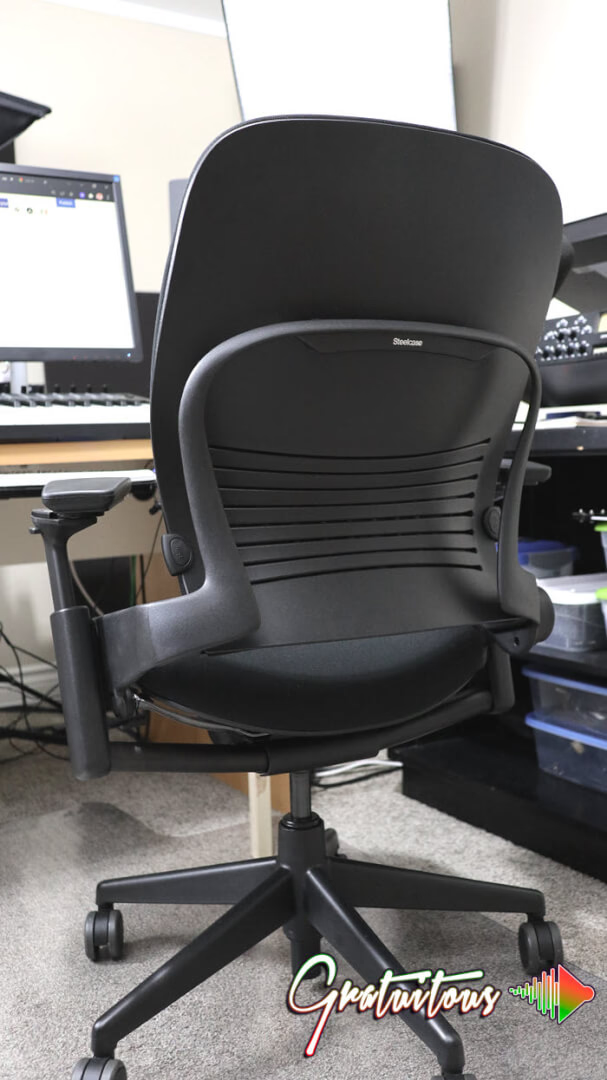
One thing I wanted to share with you though was a picture of my new ergonomic chair, as I told you, I tried about 6-7 different chairs over time.. that I’d switch out when I’d notice some type of pain. This approach worked fine for awhile as it balanced out the different pain points, until finally, the pain was just too much.

This is an ergonomic chair, by the brand Steelcase, and it’s their Leap V2. You can see it on amazon (affiliate link).

Questions About Beatmaking with FL Studio?

Alright, so I hope you enjoy the episode above, and that it prevents you from making the same actions I’ve done.

There’s times to pay a little more for quality, and there’s times to cheap out. When cheaping out starts to hurt you physically, it’s time to take a more serious look at what the issue is.

As mentioned I share, make sure you have a plan while being on a computer to be productive, and reduce screen time.

And as always, you can join my music producer training platform to learn FL Studio!

Community

Questions about this episode

Transcript

S2E15 – Getting Comfy + Healthy Work Environment

  1. Season two, episode 15. Getting comfy and a
  2. healthy work environment. So, for those of you who are brand new, if you
  3. guys want to stay updated with what's going on, I run an FL Studio training
  4. platform. You can check out the courses on there.
  5. And I have lots of free stuff.
  6. Okay. So if you're new, check the free stuff.
  7. See if you like my education, my content.
  8. If you do, keep opening up the emails, and I'll send you some sales about
  9. joining the membership. Alright, there's there's at the moment there's 26 FL Studio
  10. courses. but I want to talk about getting comfy and a
  11. healthy work environment. So I've been going through a couple health things,
  12. guys. nothing serious, but things that have made me question how I'm
  13. working. All right, because when I was an electrician, it's a totally different work
  14. environment, right? Depending on the season.
  15. You know, in the summer where I live, it got very hot, and sometimes you had no
  16. shelter, so like you just be in the sun and it's hot and you have to work.
  17. So that's one environment. Okay, and you have to dress accordingly, like in that
  18. case, you know, sunscreen, making sure that you get shade when it's hot, making sure
  19. you drink a lot of water. Let's talk about winter being in construction, let's say
  20. now. Well, you know, so it takes a lot of skill to dress good in the winter for
  21. construction. The older you are, the more tricks you learn.
  22. But there's a lot of different equipment that you can wear to stay warm, everything
  23. from long johns and how you layer.
  24. Now, there's some types of equipment, let's say, in construction that relate no
  25. matter the season, and we're and now we're talking more safety, okay?
  26. So really, dressing for the summer and dressing for the
  27. winter, it is a safety thing, right?
  28. In the summer, you can get heat stroke.
  29. In the winter, you can actually like you could burn your fingers.
  30. I worked up north this one time, and the foreman on the job site, he told me, he
  31. said, you be careful, like you make sure that you're always wearing gloves when
  32. you're touching metal, because you know, where I live, it doesn't get to those like
  33. cold, cold temperatures. But he was saying, like, you know, that is a concern up
  34. here, like where it was so cold.
  35. So those are things you don't think about.
  36. So now I wanted to more talk about like let's say like your eyes, you know, everyone
  37. you always have to wear safety glasses to protect yourself in construction if you're
  38. cutting, and if something's too loud, you know, your hearing protection, which
  39. perfectly segues into this episode with music production safety,
  40. right? Like, you know, how can we sit in our environment and make sure that we're
  41. comfy? And so, like I said, I went you know, I was dealing with a couple health
  42. things, and so the first thing I'll talk about is my eyes, okay?
  43. So I have to look at a screen a lot, and that's because in order for me to make
  44. music, well, yeah, just like you guys, I have to make music.
  45. You know, I have I need to keep practicing because if I'm not practicing, then I
  46. can't teach because I'm not in the zone, like I'm not in it with you guys.
  47. And so how much time do you sp spend producing?
  48. And that's kind of like a different episode.
  49. But really, like, you know, if ask yourself, is it an hour a day?
  50. Is it two hours a day? When I was getting into this, sometimes it was like four,
  51. five, six, seven, eight hours a day.
  52. Sometimes, you know, obviously some days were more than others, but it was all
  53. depending on what you're doing and what you're learning.
  54. Sometimes you might be making the beat, sometimes you're listening to the beat.
  55. That's all different, you know, stages of the production process.
  56. But to finish off, the hearing protection, right?
  57. You always have to protect your ears as a music producer.
  58. So, you know, make sure you're not listening at super loud levels.
  59. Another thing I want to mention on that is loud levels matter, but it's also the
  60. time, like the amount of time that you're listening to something as well.
  61. Okay. Does that make sense? Because that's important for you to know to know about
  62. safety. Because if you're dealing with earplugs or headphones on a construction
  63. site, these can block out different frequencies, and
  64. they block them out by a certain decibel amount.
  65. Okay, so a lot of these units that we use in music, like decibels, those relate
  66. in different areas of the world as well, you know.
  67. So don't just think it's just audio or just music.
  68. If somebody is working in like a factory, they're always listening to the same
  69. sounds all the time, depending on where their workstation is.
  70. So they have to wear certain ear protection that is blocking out certain frequencies
  71. because what can happen if you're listening to the same frequency over time is you
  72. become tone deaf. Okay. That's like think about that word if you don't know what
  73. that means. Like, it's like certain frequencies, like you can't you can't listen to
  74. very well. So essentially, it's like your ear is hearing like a notch filter all the
  75. time. You know, it's like it's like the mass, it's like the EQ is on the master
  76. track, and you have a notch filter in your own hearing.
  77. And this can be caused by listening to audio at too loud for too
  78. long. Okay. H longow you listen to something can really hurt your ear.
  79. Now I wanna share in case you want a visual of this.
  80. Okay. So if you'll open up the fruity parametric EQ2, the stock EQ for FL Studio,
  81. but you can right-click on a band, you're gonna go type, and you're gonna see band
  82. stop. I want you to do this. Select it and look at that.
  83. And so that's what can happen to like your ear.
  84. And if you move it left and right, that can happen to your ear if you are listening
  85. at a like to a tone, such as like let's say a motor, or again, depending on where
  86. someone's working, you listen to a tone.
  87. So like your ear is becoming deaf in those frequencies.
  88. First of all, you can listen to that tone, but you want to reduce it so it doesn't
  89. cause damage, okay? Now on the Fab Filter Pro Q3, this is now called a notch filter,
  90. okay. So again, many times within the audio industry we have different terms for the
  91. same thing. Okay, so what I'm trying to talk about is
  92. what are our safety things in the studio.
  93. All right. I hope that kind of broke down.
  94. Especially if you do work, you know, that would break down things that you have to
  95. think about safety, because if you don't, it's like you can really harm your body.
  96. And when you're young, like nine let's say 19 years old, you're super super young.
  97. And so now as I'm starting to get a little older, some of these things are starting
  98. to affect my body. And what I was also trying to say is because I switched from
  99. electrical to now doing online education full time.
  100. So I'm even looking at a screen more now.
  101. Okay. So this is really amplified for me.
  102. And I wanna share this with you so that I might save you some, you know, I might get
  103. you more comfy.. I might allow you to protect your body
  104. Cause like I said, I'm having I was dealing with a couple of some health things.
  105. So one was my eyes, and one was like my back, my back was starting to get
  106. really sore in different areas.
  107. And what I would always try to do is I'd always try to rotate chairs, and it would
  108. kind of balance out if I switched enough chairs over a certain period of time.
  109. you know, if one chair started hurting, I would get a different chair.
  110. So I did that for many, many years.
  111. Essentially, it all came down to being cheap and rushed and not looking after
  112. myself. So the first things I want to talk about is what are some things, okay?
  113. Just so you're aware. So one is your eyes.
  114. All right, you're always looking at a screen.
  115. Maybe you can turn down the screen brightness a little bit.
  116. Just think these ways. Is your lighting environment okay?
  117. Like, do you have a light on with your screen?
  118. Because if you're just in a dark room, like this is not good for your eyes, and you
  119. might not think it is right now until something starts, you know, let's say your
  120. eyes start getting really dry, or like, for example, like you know, there's drops
  121. for your eyes, but do you really want to start taking drops in your eyes for the
  122. rest of your life? You have to think that you want to protect yourself.
  123. And so there's this blue light kind of thing going on right now.
  124. I'm not a doctor again. Don't listen to any of my medical advice.
  125. I should be saying that before we get into this as well.
  126. Okay, so I'm not a doctor or an ergonomic specialist, okay?
  127. So I'm just a music producer and I'm talking to you about my music production
  128. setup and some things that I want you to know about safety in your studio,
  129. so that you can, you know, feel good, be healthy., and enjoy your day
  130. So the glasses that I've been prescribed, okay, because my eyes were starting to get
  131. dry on this on like by looking at a screen all the time.
  132. Again, I do I make beats. If I were to create a course, well, I have to edit up all
  133. those videos. I have to do the graphic design, or even if I'm doing this podcast,
  134. after I'm done recording it, I have to look at the screen, I have to chop up the
  135. voice, I have to edit it. So my eyes are always looking at a screen.
  136. So I've been prescribed glasses that gave me that give me a little bit of
  137. amplification. My eyes are actually really good.
  138. Okay. So it's not like I need glasses, and I want to really stress that.
  139. Like everyone in my family needed glasses for either far or close sight.
  140. Everyone varied. But for me, my eyes have always been good.
  141. Okay. Like 2020 vision, like super good vision.
  142. But I was looking at a screen and my eyes are starting to get dry, and like I just
  143. it was started to lead to a little bit of headaches.
  144. And again, I I don't know about the blue light stuff.
  145. It could be with that stuff, but it for me, it was a couple things.
  146. Okay. First of all, hopefully, I'm hoping these glasses are going to start helping
  147. me. Number two was how I was dealing with my time a bit.
  148. I was spending time on the computer more than what I should have been.
  149. Something that will really help you be productive is know what you want to do on a
  150. computer when you're on the computer.
  151. Like, don't just be on a computer just to be on a computer, if if that makes sense.
  152. If you think with that mindset, what you're gonna do is you're gonna take a paper
  153. and pen or pencil. I always like pencil, you can erase, but I write, you know, like
  154. what are my goals for the day?
  155. And my go.als might be a lot different than your goals
  156. But if we're talking about making beats, I always like to tell you guys I like to
  157. make beat tapes because it's something to work towards.
  158. a single beat, again, you know, single beats are fine, but you just make the beat
  159. and it's kind of done with, right?
  160. It's a beat. But when you do a beat tape, it's kind of like a little series, people
  161. get to listen to that whole beat tape.
  162. Also, you get to practice a lot, right?
  163. I I talk about this often. So, anyways, if you're gonna write down your goal,
  164. maybe your goal on this beat tape that you're gonna make.
  165. And again, I'm not telling you guys to like sell this beat tape, it's just kind of
  166. like a portfolio that if someone comes to your website, they can download your beat
  167. tape, they can see what you're about.
  168. And for me, I just continued with that.
  169. So I got to a couple volumes now, right?
  170. So let's say this beat tape idea is intriguing to you.
  171. So, what you could maybe do is you you could you could write down, you could say,
  172. I'm gonna pick out the beats that I want to beat on this beat tape, because that is
  173. one step of the beat putting a beat tape together, right?
  174. That's one of the steps, is like you have to figure out well, what beats do you
  175. actually want on the beat tape?
  176. And it's not as easy as you think, because sometimes your favorite beats aren't the
  177. favorite beats of what other people like of your music, but I always caution you
  178. guys, you know, you do want to release what you do ultimately like, but you can
  179. always get feedback. But you know, so write down your goals before you hop on the
  180. computer, and I promise it's really, really gonna help allow you to know what you're
  181. doing on a computer. You look at your list and you're kind of like, Do you know what
  182. I'm done for the day? And then when you come back the next day, if you want to look
  183. at that list, you can you can finish off that list.
  184. finish off Don't feel that you have to that list.
  185. the But just what's your
  186. goal for day? It's gonna allow you less time on the screen unnecessarily.
  187. Like if you have to do a lot of work on the computer, like that's different.
  188. Like, but you're being productive.
  189. but I hope you get what I'm saying.
  190. Just instead of just being on a computer, you want to be on the computer for a
  191. reason. That's what I'm getting at.
  192. All right. Now the next one I want to talk about is your chair.
  193. So, like I said, I always try to bounce between chairs to
  194. help fix my sore back. And it was happening in a couple different areas depending
  195. on the chair I was sitting in.
  196. And I'll actually tell you guys the different styles of chairs I was sitting in,
  197. because it's really gonna make you understand.
  198. Before we go further, I do want to let you know that recently I just purchased an
  199. ergonomic chair. I didn't want to spend a lot of money on it.
  200. And if you look online to purchase these chairs, they're way they're typically way
  201. more expensive. So, my suggestion to you before we go into this story about
  202. different chairs, is you wanna actually go to a store that you can try the chair
  203. because everyone's body's different.
  204. Okay, sometimes these retailers can also give you a bit of a better price because
  205. they're distributors, and that's just kind of how it works, okay.
  206. Now, I'm actually talking about like an ergonomic chair.
  207. So, what does that mean? Ergonomic means comfort, right?
  208. And man, there's ergonomic stuff for everything.
  209. Everything from your key, like your actual typing keyboard or mouse to like your
  210. chair, there's foot rests, like, and that's just sitting, but I guess like they have
  211. like those standing desks and stuff right now, too.
  212. So again, I really want to stress that that if you are looking for a comfortable
  213. chair, and they're not cheap. Okay, we're looking like about like a thousand bucks
  214. for a nice chair. And but what I'm trying to say is I've I've been sitting a lot.
  215. I've been on a computer a lot, and I'm not 20, right?
  216. I've pushed my 30s, so but I'm telling you that I've got a new chair, and
  217. it is it is worth it. And it's something that we don't want to spend our money on
  218. either, and that is why I was saying kind of like cheap and lazy and not looking
  219. after myself. Because, right? The chair is expensive.
  220. Now, let me just tell you a little bit of the story.
  221. It's gonna help you understand what I've learned.
  222. So, like I said, I was always bouncing between chairs.
  223. I would bounce between chairs with you know, with a back.
  224. I tried a kneeling chair, all right.
  225. I purchased one off Amazon, it was like a hundred bucks, let's say, in that, you
  226. know, it was a cheap one. And I was just thinking, oh, a kneeling chair would be
  227. good, you know, for better posture, but you know, over time it's kind of like it
  228. wasn't super comfy. And you know, I want to be sitting.
  229. I don't want like a kneeling chair was kind of like a workout.
  230. So there's that. Now, another problem that was happening is I have two different
  231. desks I work at. I work at like my studio desk, which is where I make my beats and
  232. stuff, like that's where I do music and courses and the even the podcast.
  233. But when I do work, I typically like to not always be in the same room because like
  234. I said, I would be in the same room all the time, and you're always in the same
  235. position. And so that is one that's probably the first thing I'll tell you is taking
  236. a per you know, taking a quick break, standing up, go get some water, look around,
  237. you know, especially if it's the daytime.'s
  238. the If you have a view, you know, if you can if there like nice trees or something,
  239. like look at trees for a little bit, and then you can go put back in your session,
  240. like however long you usually work.
  241. so taking breaks is gonna help your back and shoulders and arms
  242. and all that stuff, right? So, another problem that was happening to me is depending
  243. on the environment I was working in, different pain points were happening.
  244. So I tend to like to reach for my mouse.
  245. If I'm sitting in a chair, sometimes like I'm I'm hunched and I'm looking forward,
  246. and so that's not good. Okay, you're gonna get like upper back pain, which is what I
  247. was getting. It was actually getting kind of bad, like to the point where it's just
  248. like I just had to like lay there and just like take a break.
  249. I was like, I'm actually in pain from sitting.
  250. Okay, so it's just because I pushed it, I pushed it too far.
  251. Now, again, this is all depending on your sitting environment, all that stuff.
  252. So, what I wanted to say is that I purchased an ergonomic chair, something I should
  253. have done a many, many years ago, and I'm just trying to tell you guys that it's
  254. worth it. Now, the brand I purchased, it's by Steel Case for my research.
  255. They seem to be like the industry leader, and I got the leap version too.
  256. I tried a couple different chairs again.
  257. I did it locally, and one thing I will say is I got a very good deal on it locally
  258. because of a local distributor.
  259. I remember looking on Amazon for this chair, and it was like double, maybe even
  260. double and a little bit more. Go try the chair out, and then you justify, you know,
  261. is it worth it? I tried a couple different brands.
  262. I don't want to go in into tons of different brands, and I'm not sponsored, okay.
  263. I I don't do the sponsorship ships on the podcast.
  264. It's just me. Okay. So I purchased a chair.
  265. I'm telling you guys, it's been amazing.
  266. My comfort is much better. My back's much better.
  267. And I'm telling you, it was pain.
  268. Like it was to the point where I had to stop.
  269. Like it's this case, stop. The chairs definitely helped that, but all of these
  270. things really did come down to really second guessing what I'm doing on
  271. a computer. Okay. And that's really gonna help hopefully you
  272. just to double check on you know what's the purpose of you being on a computer right
  273. now. If you're on a computer, your eyes, what I did was I purchased
  274. just a single monitor stand and I brought one screen close.
  275. So it wasn't too expensive of an upgrade.
  276. It was like the stand's like 120 bucks.
  277. Again, I bought that locally. So now instead of me reaching forward and hurting my
  278. upper back, right? I've brought the screen closer to me.
  279. I also have this old keyboard tray.
  280. If you've been around since the Beach Struggles day with that desk, I still have
  281. that same desk and the same keyboard tray.
  282. So that was definitely a good purchase.
  283. That was nine years ago, eight years ago.
  284. A keyboard tray, again, is one of those ergonomic things to get comfy.
  285. And a really huge benefit of them is it allows your MIDI keyboard to
  286. come closer to you. one thing I do want to say, I was thinking about this is
  287. okay. When you're sitting down when it comes to comfort, I need you to actually sit
  288. in your studio and think about this.
  289. If you're moving your hand a certain direction or whatever's going on, are you comfy
  290. and is it a good workflow? Is something awkward?
  291. And so that's what this keyboard tray helps with.
  292. Okay. So it allows my typing keyboard to be right in front of me to use the computer
  293. if I'm doing research, typing things, and the mouse is also on this keyboard tray
  294. too. So it's pull out, right? I can pull it out, I can rotate it like back and
  295. forth. And it this one's has a separate mouse pad.
  296. This allows you to bring your MIDI keyboard closer because when I make beats and use
  297. FL Studio, I'm using my transport buttons a lot, especially more in the beat making
  298. stages, like the very, very early stages of the beat.
  299. That's where I'm using the transport buttons a lot.
  300. Once it goes to the mixing, I'm often using my space bar, and now you're kind
  301. of in plug-in mode, right? You're going from EQ to compressor,
  302. reverb, whatever. You're always kind of with your mouse right now.
  303. So are you comfortable with your MIDI keyboard when you're making the beat?
  304. Which is kind of like let's say in the summer months or something.
  305. All right, if that makes sense.
  306. Now, if we go to the winter months, now let's say we're into the arrangement, we're
  307. into the mixing, we're into the mastering.
  308. Now we're more a little bit laid back.
  309. We're more back into our chair, all right.
  310. And you want to make sure that this setup that you are actually into your
  311. chair. Okay. Like you, like, so what I'm saying is like you need back support.
  312. And so that's what these ergonomic chairs do is like they rest up against your back.
  313. You want to make sure that you're in that chair, all right?
  314. And when you're using your keyboard and your mouse, it's kind of just like it's just
  315. part of your comfortable kind of work environment..
  316. And again, it all comes down to getting up and taking breaks too
  317. Yeah, I wanted to kind of compare it to because I was doing electrical.
  318. Now I started to be on the computer more like full time all the time, right?
  319. And so, you know, my eyes were starting to get a little bit dry.
  320. And I find that if I would go for a walk, like if you know, if I go outside, like my
  321. eyes weren't as bad. And so when I was an electrician, well, I was outside all the
  322. time, right? So these are things I I wasn't really realizing until now in front of a
  323. screen. One thing I do want to say about that is at first with my eyes when they
  324. weren't doing great, I tried to be cheap again.
  325. And I tried to purchase these blue light glasses online.
  326. And I didn't purchase a super cheap one.
  327. I purchased, you know, a decent pair.
  328. But you have to remember, these are not from a trusted eye doctor, you know, someone
  329. you have been going to for a little bit, that you have done an eye exam with them.
  330. They've, you know, done what they needed to do to check your health, your eye
  331. health. And so, you know, a glasses that are prescribed for your eye, well, these
  332. are professionals, right? And if you're trying to fix it yourself, you know, so all
  333. I'm saying is if you're gonna be doing if you think you need glasses for a computer
  334. or something, you make sure you go to the professional, right?
  335. Because if you do it yourself, you're just making the problem, you know, potentially
  336. worse. And again, it wraps around to asking yourself, what are you doing on a
  337. computer? You know, what's your end result being on the computer for that day?
  338. What do you want to get done that day?
  339. So hope that gets you thinking.
  340. For me, getting a glasses upgrade.
  341. I've never worn glasses in my life.
  342. All right. the chair, I am so happy..
  343. Okay Like I said, I didn't want to pay this price.
  344. You know, I was like, oh no. But my back was getting really sore.
  345. And it's no different than, like I said, if you're an electrician or plumber or
  346. whatever, if you're a construction, you gotta buy a new drill.
  347. You know, something that's a little bit more expensive that is supposed to last you
  348. for like, you know, that three, four, five years, right?
  349. You know, when you have a job, like the employer expects like a lot out of the
  350. worker, you know, like you have to drive to work in your own vehicle.
  351. And so these are like kind of hidden costs of your job, right?
  352. And so being a music producer, you know, these are kind of the hidden costs of being
  353. on a computer all the time, right?
  354. And for me, you know, I'm a little bit more than just a music producer, right?
  355. Like, I'm always kind of creating content, etc.
  356. etc. So I'm on it even more than than I've ever been, actually.
  357. But again, it all comes down to breaks need to be taken, know
  358. what your goals are on the computer, look at your sitting position, you know, is
  359. there good light going on? Is your chair comfy?
  360. Are you overreaching? Like I was again, I was getting upper back pain on certain
  361. chairs, I was getting lower back pain.
  362. And so, like I said, I try to mix and match between different chairs, and I'll also
  363. quickly talk about some things when it came to this chair in case you are interested
  364. in buying one. So now I'm not talking about like a $300 chair from like
  365. a box store that is like you know, promises to be ergonomic.
  366. And another thing I want to say is don't think that the more expensive you pay in a
  367. chair ch.air, the better it is
  368. The chair really does have to match your body type and your comfort and has the
  369. features you want. Like, so for example, these chairs are not just simple chairs,
  370. like they're thinking about your work environment.
  371. They're like an aggressive work environment on the computer.
  372. And you may be like, Well, what are you talking about?
  373. Again, I got the steel case leap v2, or it could be the v1, I'm pretty sure it's the
  374. v2. Okay, I bought it recently.
  375. So these armrests, obviously, yeah, I can go up and down.
  376. Most armrests can do that. Another really powerful thing is that if you lean
  377. back, the armrests don't move because that's a problem sometimes.
  378. Like, for example, if you work close to a desk, and if your chair goes underneath
  379. that desk, okay, and if it just goes under, it's like you can't lean back because
  380. the desk is preventing the armrests because they're essentially attached to the back
  381. rest. That's how it's made. And so when you rock, like the armrests go with the
  382. chair. Well, if you would go back hard enough, you know, you could flip the desk, or
  383. you could, you know what I mean?
  384. So these nice ergonomic chairs, the arms don't move, and it allows that flexibility
  385. in your back. Now you have a tension knob that determines, you know, if I
  386. lean back, how much force do I have to use to lean back?
  387. Because again, depending on the work environment you're in, you you know, you might
  388. want to just always make sure you're sitting up straight so that you can work longer
  389. periods more comfortable. Again, you can loosen it up and it could be more relaxed
  390. time. Like, let's say, let's say you wanted to do some research and you wanted to
  391. watch a tutorial. So, you know, in my case, I would make it go full screen.
  392. I'd maybe loosen it up a little bit and I'd kind of stretch back a little bit..
  393. All right the chair, this one, anyways, allows you to adjust the seat.
  394. So the seat can go forward and back because depending on if you're taller or
  395. shorter, you know, like if the seat's too short, it feels really, really awkward.
  396. And if it's too long, then like your legs hang.
  397. So you want it to be a sweet spot so that you got a nice setup going on.
  398. Okay. It also has what's called like a lumbar support.
  399. So this is like for like your lower back.
  400. And each chair has their own way of doing it, but it's something that just kind of
  401. slides up and down, all right?
  402. But it just gives you that support.
  403. And what makes this chair really nice is it also has a tension, it allows that
  404. lumbar support to go in and out.
  405. So again, what I really want to stress with these ergonomic chairs is you don't want
  406. to be paying really anything less than like let's say a thousand bucks.
  407. All right. I tried quite a few chairs.
  408. I went to, you know, big box stores where they had ergonomic chairs and they're like
  409. $300. And I thought $300 was a lot when I was trying those ones.
  410. But you know, I went online and I was like, because my back was sore, right?
  411. And it to me, it wasn't no longer just to kind of buy a nice chair.
  412. It was like I need to buy like a chair for work.
  413. And so I thought to myself, I was like, $300, like that's quite a bit of money, you
  414. know, for a chair. And I was just like, well, let's see, like what are like the
  415. really good ergonomic chairs? Because I like to do research that way.
  416. I like to research like, you know, what's what's like the most expensive in that
  417. category. And I work my way down and I kind of see how much my how much am I willing
  418. to spend at this moment. Anyway, so I tried quite a few chairs..
  419. And this chair, which was a thousand dollars, again went to a local dealer, so I got
  420. a good price on it Online, it was like over $2,000 Canadian.
  421. Okay. When I went to the local distributor and found out it was it was a like around
  422. a thousand bucks, I was like, okay, like that's a fair price, right?
  423. Now there was another chair I saw at a different dealership, and their
  424. chair online was a thousand bucks.
  425. And so it's the same price as this chair that I'm sitting in, okay.
  426. And I tried it, it was pretty comfy, but I it just felt like big, like that like the
  427. chair felt huge, and it just kind of like you know, in a in a studio, you know, you
  428. want just like a kind of a chair that just feels like a normal chair, but you're
  429. just looking for comfort. And so that's what I wanted to pass on to you is that
  430. there was these two different chairs, both the same price, and I really do feel that
  431. this steel case leap v2 that I'm sitting in was like superior to that chair, like
  432. it was just way more comfy. Now for the armrests, for example, yes, it can go up and
  433. down, but it can all like the actual armrest can go forward and it can go back, it
  434. can go in more, it can twist. Okay, so it's just it's if you
  435. watch some reviews on them, you're gonna start to learn like different features that
  436. they can come with. Okay, so if you guys can think of any PPE is what we would call
  437. it on the job site, personal protective equipment.
  438. I think that's the I think that's what it is.
  439. So PPE, right? So on a construction site, these were things like earplugs, hard hat,
  440. steel toe boots, right? Here in Canada, it has to have that green triangle, you
  441. know, to say it's certified for on the job site, Viz Vest, right?.
  442. You know, those are kind of like all like your kind of basic ones
  443. I'm sure I'm forgetting something.
  444. But you know, depending on what you're doing, you have to wear the right equipment,
  445. the right safety equipment. Now, one thing I will also say further with that, is
  446. depending on what you're doing, you might have to wear an additional piece of this
  447. PPE. Okay, so the PPE, so the earplugs, hard hat, that's just for your
  448. typical worker. Everyone needs to wear that stuff, okay?
  449. Like depending on what their task is.
  450. But let's say like your angle grinding, okay.
  451. So if you don't know what this is, it's like this this disc that over time gets
  452. depleted by how much usage, but like they can like break free, and like they're just
  453. they're actually dangerous at certain times.
  454. But so an angle grinder, you gotta wear like a face mask because of those
  455. safety issues. And so in your environment, it might be a little bit different.
  456. Okay, you know, at different stages of the production process, it's kind of like now
  457. we gotta maybe put on different safety equipment.
  458. Like I said, when we're when we are making the beat, I'd be more hunched over a
  459. little bit, but it's not like I'm just hunched over, it's more kind of like you
  460. know, you're moving around a little bit.
  461. So whatever, you know, you're just you're in the chair making the beat.
  462. After you're done making the beat, well, now you're gonna go edit the notes.
  463. So now you're sitting back. So that's kind of like changing tasks, essentially, and
  464. you have to reassess. Well, you know, how can I stay safe here for the long term,
  465. you know, to protect my body so I can feel good every day.
  466. The thing is, if things are going good, they're going good.
  467. You don't think about this type of stuff, you only think about this stuff after,
  468. once you're going through the pain, like I said, my eyes were very getting sort of
  469. my eyes were getting so sore that I had to go to an eye doctor regarding this.
  470. Okay. What I was trying to tell you is that my eyes are great.
  471. I can see very, very good, far and close.
  472. It was the screen that because of my of my change in work environment from
  473. electrical to teaching beat making, the podcast, just being on a screen more.
  474. And it's really made me realize that you have to protect yourself in these
  475. environments. But again, sometimes you don't know how.
  476. And that's what I wanted to share with you guys.
  477. the things I learned. So hopefully, if you're looking for a chair that this
  478. information has helped you, again, do your research online, but then go to a local
  479. shop. I promise you, you're gonna be way happier.
  480. And I hope you find a better price like I did.
  481. For your eyes, again, make sure you have good lighting as well as do you need to
  482. bring your screen closer to you.
  483. Another thing I'll I will mention is Windows allows you to zoom in your screen.
  484. Like you can go like 125% or 150%.
  485. FL Studio allows you to zoom in as well if you need that.
  486. So lots and lots of things to think about, you know, even drinking water.
  487. But again, you guys let me know if you have, you know, if you've had any issues and
  488. what were your ways to fix them.
  489. I think it would be interesting to know.
  490. And thanks for checking out the episodes.
  491. So if you guys want to learn FL Studio and beatmaking, just visit my website, okay?
  492. Go to it's gratuitous.com. There will also be options if you're brand new, you know,
  493. to check out like my FL Studio Beginners book and my FL Studio Beginners course.
  494. and And. finally, check out the membership where you can actually just watch all the
  495. courses you get the best experience
  496. And if you ever have questions or need help, I always tell you guys my email is
  497. open. So hi at it'sgratuitous.com.
  498. And I will talk to you in the next episode.
  499. So thanks for listening
  500. to the
GratuiTous Radio Start free Join Membership 0:00/0:00