
Spend $50, get $25 OFF — applied automatically.
Skip to Content Skip to Navigation Skip to Footer
Join Membership
Season 2 ·

S2E29 – The Course Pathways

0:00 / 0:00
This media could not be played.

Never Miss an Episode

Get new podcast episodes delivered to your inbox.

Home/Podcast/S2E29 – The Course Pathways

If you are wanting to rapidly decrease how long it takes to make beats, then you should definitely checkout my COURSE PATHWAYS.

I’ve set it up in such a way for you to learn how to make beats in as little as 3 months! Now, you won’t be “amazing”, but you will understand the core concepts to get moving.

Anyone who has entered the world of music production knows that it isn’t an industry that you can learn in 1 year, 2 years, or even 5 years. It’s an ever-learning industry, and takes a LIFETIME to master.

This is because you can be trying to learn beatmaking, mixing, mastering, arrangement, and all of these require hours of practice and studying.
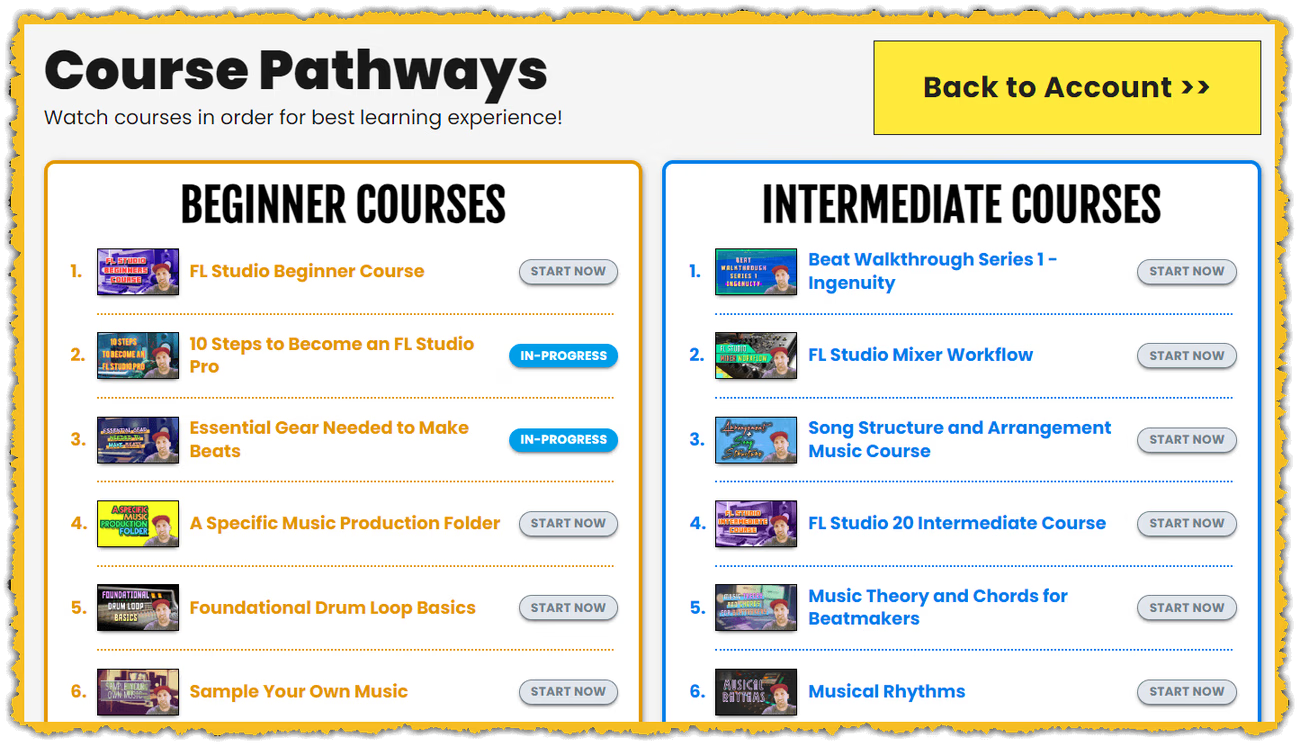
COURSE PATHWAYS - GratuiTous' FL Studio Training Platform
My COURSE PATHWAYS page (July 14, 2022!)

Course Pathways – Learn FL Studio

So if you’re wanting to learn FL Studio fast, take a look at my membership!

You can access to all the courses, then you simply follow each course in order on the COURSE PATHWAYS page.. that’s all there is to it!

Lots of great results from previous students..

CONTACT ME if you have ANY QUESTIONS!

Community

Questions about this episode

Transcript

S2E29 – The Course Pathways

  1. Season two, episode 29, The Course Pathways.
  2. So if you guys are a member of my platform, you guys know what the course pathways
  3. are. But if you're new or if you've just been always listening to the podcast, the
  4. course pathways is my training curriculum where you watch the courses in order and
  5. you get the absolute best learning experience.
  6. It's like if you were going to go to college or university that they kind of lay out
  7. the curriculum in such a way for you to learn.
  8. And that's how I have laid out my curriculum, all these different courses.
  9. So we're I'm now up to 29 courses.
  10. So the five golden pillars of music production, which I talked about in the last
  11. episode, it is now released. I talked to you about so many valuable tips that I wish
  12. I knew before I started up, you know, learning FL Studio beat making and getting
  13. heavily involved with music production.
  14. One other thing I want to share with you guys is a new course is also in the works.
  15. So again, like I said, I'm getting back into course mode here.
  16. I'll try to get them released more often now.
  17. This one is going to be about hands-on mixing in FL Studio.
  18. Again, I'm just in the middle of recording it.
  19. It's going pretty good. And it's just about hands-on mixing.
  20. I'm focusing mainly on Fab Filter plugins, but you will be able to relate the
  21. content to any plugin that you're using.
  22. And I also make a specific dedicated video just for Ethel Studio stock plugins, just
  23. for you to get a kind of similar experience.
  24. Okay. So we talk about global links, getting hands-on with your MIDI keyboard, and
  25. it's really given me a really, really good workflow when I'm mixing my music,
  26. getting hands-on. It's something I've always really wanted to do, and I've had some
  27. time to play around with it. And I'm just making a course teaching you about how to
  28. get hands-on, teaching you about some mapping formulas.
  29. I've never really played around with that too much.
  30. That is when you right click a knob and it has override global link.
  31. Then it has like the little mapping formula there where you can enter in like a
  32. little math calculation. We cover a bit of that stuff, and it just shows you how to
  33. fine-tune the knobs. really, really powerful stuff.
  34. Okay. So again, be on the lookout for the hands on mixing course..
  35. Again, if you are a member, you get that when it releases
  36. One final thing I will share with you guys is if you're looking for lessons, I've
  37. been having some lessons with a couple of you guys.
  38. I have a special offer right now.
  39. For your first lesson, you get the lesson, you'll get my FL Studio Beginners course
  40. and my FL Studio Beginners book.
  41. If you're interested in that, just go to it's gratuitous.com forward slash lessons.
  42. Okay. Again, all links will be in the show notes.
  43. And before we hop onto the course pathways, finally, if you want to stay updated,
  44. visit it's gratuitous.com forward slash podcast.
  45. You guys can sign up with your email and you guys will be notified when I release a
  46. new episode. Or if you guys just want to grab some freebies, I have like free books
  47. and free sounds, just go to it's gratuitous.com forward slash resources.
  48. Okay, that's kind of all the advertisements and promo in this episode.
  49. So again, I just want to talk about the course pathways.
  50. Now you just go to it's gratuitous.com forward slash course dash pathways, and
  51. you will see that it has beginner, intermediate, advanced, and there's piano
  52. lessons, okay? And so all you have to do is you literally just watch these courses
  53. in order and you will learn beat making very, very fast.
  54. You will become a very well-rounded producer because my teaching style, I teach you
  55. guys how to be a well-rounded producer, somebody who wants to learn to program their
  56. own MIDI notes, somebody who wants to create their own drum loops from scratch.
  57. Now, someone emailed me and they're like, it sounds like you don't like sampling,
  58. and that's not what I'm saying, okay?
  59. So I've told you guys in a previous episode, there's only two real ways to make a
  60. beat, okay? That is original compositions and sampling.
  61. But if you're just using pre-made loops, dragging them in and calling it your own
  62. beat, that's what I'm calling that's that's not music production.
  63. That's not fun. You're not having the true reward.
  64. Sampling is an art. Probably like one of the best examples is like California Love
  65. by Tupac. That song, just like the beat, is a hit, right?
  66. It's so catchy, so powerful. And so that's like a really good example of sampling.
  67. It was an old song. They took it, they sliced it, they chopped it up, and they just
  68. really kind of like improved on the beat and made it more like a rap song.
  69. Original compositions is when we have our MIDI keyboards and we have a virtual
  70. instrument and we are playing melodies to make our beats.
  71. Those are like the only two ways to make beats, okay?
  72. Original compositions and sampling.
  73. But if you're dragging in your stuff, you know, like a pre-made drum loop and you're
  74. just kind of calling it your own.
  75. That's where my platform, that's where I'm always trying to teach you to step
  76. outside of that, kind of take off the training wheels and actually learn the you
  77. know how to program your MIDI notes.
  78. Understand that MIDI is the most powerful tool that you have as a beat maker.
  79. When you program your MIDI note, right?
  80. We can adjust velocity, you can adjust timing, you can change your note, you can
  81. change the length of the note.
  82. Okay. So that is essentially what you're going to be learning through my platform.
  83. And when you visit the course pathways, all right.
  84. So you first start off with the beginner's course.
  85. It's going to break down how FL Studio works, but it's also going to teach my own
  86. workflow. Okay. So I have a lot of cool little tricks that I like to do.
  87. And you only learn that again if you join the platform and watch my courses.
  88. So I teach you about like the number pad.
  89. I teach you about setting up your windows, like you know, your your actual channel
  90. rack, your mixer, your playlist, all these various keyboard shortcuts, like using F2
  91. if you want to label something.
  92. I always like to label things in capitals, makes things look really, really clean.
  93. And so the beginner's course, even if you have been producing for like three or four
  94. years, it essentially kind of introduces you to my teaching style.
  95. Okay. So I highly advise someone who is joining, you start with the beginner's
  96. course. Again, you can always watch courses at like 1.25 or 1.5 times speed if you
  97. want to absorb the content quicker.
  98. Or again, you can even skip over certain videos if you know that stuff.
  99. But for the most part, I highly recommend that again, you just work through the
  100. videos. So that's the beginner's course, right?
  101. You learn all the basics, but also how the program works and how I use the program.
  102. So when you start going into the other courses, then you start to learn my workflow,
  103. and everything starts to kind of amplify.
  104. It's just way more clear because you get to learn my teaching style.
  105. And even in that beginner's course, we even make a little beat together.
  106. So after you kind of learn the program, then you get to see how a beat's made.
  107. It's not like a huge beat, but it's a beat where all of a sudden it kind of all gets
  108. put together. Then you go into the next course.
  109. I just have at the moment, it's 10 steps to become an FL Studio Pro.
  110. That is like an eight-hour course.
  111. It has so many videos in there.
  112. and it essentially walks you through the whole music production process, like
  113. everything from how to count beats and how to program a drum loop to your melodies
  114. to the mixing to the mastering to the exporting.
  115. It teaches you about safe spots, it teaches you a bit about audio painting, and it
  116. just kind of prepares you even a little bit further for my teaching workflow.
  117. So that one's 10 steps to become an FL Studio Pro.
  118. I also have a course that's called a specific music production folder.
  119. This one teaches you how to create a custom music folder.
  120. And I'm telling you that that's what that's the approach I've taken.
  121. So there's two ways you can go about organizing your music files.
  122. You can use FL Studios built-in file management system, which has been new and
  123. improved.. So you can go that approach
  124. but for me, I just like the own custom music production folder.
  125. It's done me so well over the years, and I highly recommend it.
  126. And I walk you through step by step how to set it up.
  127. It makes the backup process and if you purchase a new computer at a you know, in
  128. let's say in three or four years, it makes the transfer process so easy because this
  129. is what happens. If you're brand new, if you've never, you know, got into music
  130. production, you'll be able to use your own computer at the moment, which probably
  131. isn't that powerful of a computer, usually.
  132. And then what happens is as you start to progress, your projects start to become
  133. bigger, you start to acquire different plugins, you start to become more advanced.
  134. Then your computer isn't able to handle what you're throwing it at anymore.
  135. But that's a good thing because it's telling you that you're improving, okay?
  136. And then typically your first computer that you do purchase for music production, I
  137. do suggest you buy a half decent computer, right?
  138. And it's all about that CPU. But when you transfer your music production folder from
  139. one computer to the next, if you follow my custom music folder approach, I'm telling
  140. you it is so easy. You can literally just get up and running within like a day, and
  141. it won't take too long. Like, yes, you have to obviously go in and install all your
  142. different plugins or whatever, but for the most part, it's a pretty seamless switch
  143. over. And so that one is called a specific music production folder, and that's why I
  144. have it the third course, okay?
  145. All right, so I highly encourage you guys to check out this course pathways.
  146. Again, there is 29 courses, so there is a lot of information in here.
  147. I was looking at it just the other day.
  148. There's over like 60 or 70 hours of content and over 400 videos in the platform
  149. now, which is awesome. Any of you guys who have been coming in, you guys have just
  150. been super happy. I'm super happy that I can help you.
  151. And I just want to say thank you for those of you who have left good reviews.
  152. it just helps with new business.
  153. All right. So again, check out the course pathways.
  154. There is so much in there. Like if again, I just talked to you about like the
  155. beginner stuff, and kind of like by checking out the beginners course, you're gonna
  156. learn my workflow. But you know, if you want to learn how to program drum loops,
  157. right? I have a beginner's kind of drum loop course.
  158. I talk to you about how to use your MIDI keyboard, right?
  159. How to get it set up and how to get a good workflow, how to set up your audio
  160. interface, like that's like the super basic stuff.
  161. But then you know, if you want to learn sound design, there's sound design in there.
  162. If you want to learn how to play the piano with improvisation, right and understand
  163. music theory and where you know how you can play your notes, right?
  164. All that's in the platform. If you want to learn how to use the mixer, if you want
  165. to understand how to purchase music production gear and how to save money, there's a
  166. course on that. It's called Essential Gear Needed to Make Beats.
  167. There's a course about arrangement, right?
  168. And essentially, you guys have if you've been listening for a while, you understand
  169. about audio painting, right? It's all about preparing the listener.
  170. And again, as you progress through all these courses, they're laid out in such a way
  171. which they just help you advance, okay?
  172. So I just highly encourage you guys to check out the course pathways, and that's it
  173. for this episode, all right. So be on the lookout for the new hands-on mixing
  174. course. I'm excited to get that one out.
  175. It's really giving me an amazing workflow when I'm mixing in FL Studio with Fab
  176. Filter plugins. But again, I will be creating a video specifically for FL Studio,
  177. kind of more common plugins, but again, you can. relate the information and apply it
  178. to whatever plugin you are using
  179. So if you have any questions, just visit it'sgratuitous.com forward slash contact.
  180. You can send me an email directly.
  181. I usually get back to you within a day.
  182. And stay tuned. Lots of new courses are coming out for you guys as members.
GratuiTous Radio Start free Join Membership 0:00/0:00