C Major Scale
This free piano chords tool shows the exact notes, chords, and scales most producers use for major & minor beats. Pick a root note, tap Scale or Chord, and the notes you’re allowed to play light up.
My Piano Lessons for Producers Course (save 50%) teaches that when picking a key and scale, there’s only 7 notes available in an octave. This piano scale helper tool answers WHAT NOTES DO I PRESS!
How to Use This Piano Chords Tool
- Pick a root note. (the note a chord or scale is built FROM)
- Scale mode: highlights the 7 notes your melodies, basslines, and chords use to stay in pitch (it only shows one octave, but in each octave these 7 notes repeat).
- Chord mode: highlights the notes played at the SAME time. It also offers an inversions feature showing different variations of that chord.
A fullscreen button in the top-right of the free piano chords and scale helper is also available to view the piano tool larger.
This tool is not meant for learning which fingers to use or properly calling a note “sharp” or “flat”. It’s for knowing what notes you’re allowed to play in a chord & scale when programming MIDI Notes in your DAW for melodies.
This page will now teach you what producers need to know about piano for powerful beats, improvisation, chords, and melodies. For in-depth training, purchase my Piano Lessons for Producers course.
It is written for producers to understand sound selection for easy mixing, loudness, and fitting melodies & instruments in a beat elegantly.
What is an Octave?
Producers: Octaves are the secret to easy mixing.
In short, a piano has 12 notes that keep repeating. Those 12 notes are what you call an octave.
By going up or down an octave, you’re playing the same note, just higher or lower in the frequency spectrum.
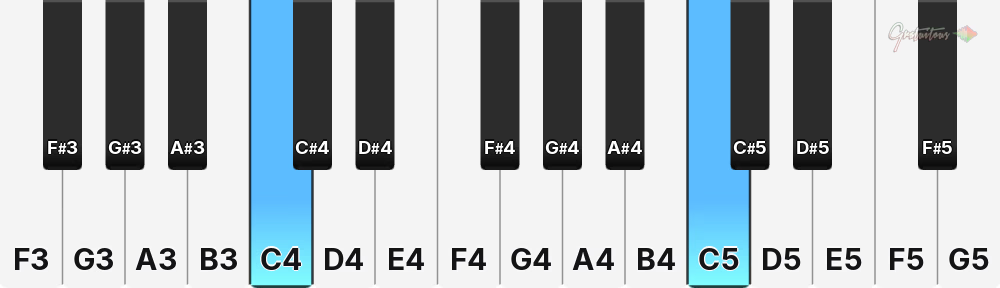
Going up an octave doubles frequency, going down halves.
For example:
- A3: 220Hz
- A4: 440Hz
- A5: 880Hz
Going from A3 to A4 doubles the frequency!
Octaves are critical for producers because if all their notes are in the same octave, the sounds fight for space in a mix!
By playing the same notes and chords in higher or lower octaves, we naturally spread sounds out in the frequency spectrum for immediate space.
When it comes to human ears & speakers as producers, we are focused on 20Hz to 20,000Hz; so we are constrained on space, and octaves are the first place to look to make sounds fit easily.
Recap: an octave is just 12 notes that repeat. It’s the first step to understanding music theory, programming powerful MIDI Melodies in beats, and making a piano stop looking confusing or random!
Try it: pick a root note in the piano tool above, then count the keys until you land on that same letter again (black ones included!). The 13th note will be the same note you started on but higher or lower in frequency. That’s an octave!
What is a Scale? (Your “Safe Notes”)
So this is the tricky part..
I just told you there’s 12 notes in an octave..
But when playing piano, there’s actually 7 notes that will be in pitch in that octave! This is called a key & scale. 🤯
Here’s how it works (my piano chord tool above does this):
- First start by picking a Key (root note)
- Then pick a scale (producers mainly use Major and Minor)
- Result: You’ll only see 7 notes available in an octave!
These 7 notes (given when picking a key & scale) are what we use to play melodies, arpeggios, chords, basslines, program 808s, etc.
If you try to play notes other than the 7 notes given, you’ll immediately hear your music be out of pitch!
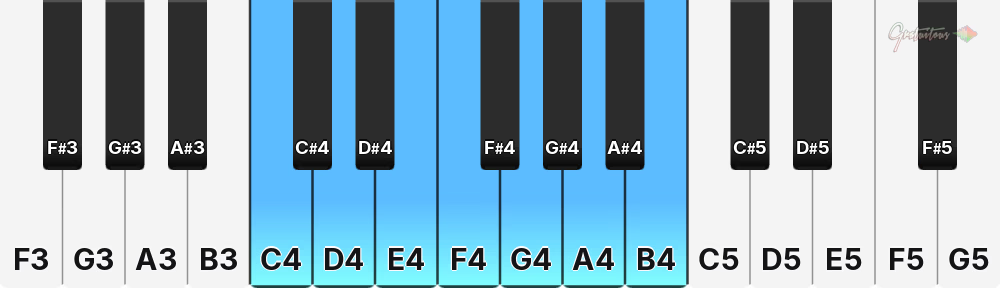
Now there’s TONS of different scales, but producers mainly focus on major and minor.
Major scales go: W W H W W W H
Minor scales go: W H W W H W W
W (Whole step) = This means 2 notes over (2 semitones)
H (Half step) = This means 1 note over (1 semitone)
This is why music scales skip a full note, or have notes right beside each other. The major/minor note pattern is different!
Story time: my confusions learning keys & scales were:
- “Why does pressing only white notes sound in pitch?” – The answer was I unknowingly played C Major (which only has white notes in its Key & Scale!!)
- The same was true for “why does pressing only black notes sound in pitch?” – The answer was I played a scale that had all black notes (but.. there’s only 5 black notes, so that meant 2 of the white notes are a part of that key & scale – I just didn’t know what those white notes were.. but now you can see in the piano chord tool above!).
Pro-tip for producers wanting to learn piano: I recommend learning only one or two keys & scales to accelerate faster, build muscle memory for piano improvisation, and learn your DAW faster.
In short: Use a Key & Scale to get the 7 notes in an octave for your melodies, chords, 808s & bass lines to be in pitch.
Try it: Click the Scale tab, pick a key, then your scale. Under the piano you can see the W/H pattern for Major vs Minor differences.
What Key Should My Beat Be In?
If you’re making a beat from scratch you can choose any key. (On an advanced level, certain Keys & Scales target better low frequencies that speakers and subwoofers can produce easier & translate better to smaller speakers like phones.)
If you’re sampling, it’s critical to match the SAMPLE’s key to your beat if adding your own melodies & bass lines on top of the sample. (You can pitch the sample up or down to match a key, too!)
Can you use more than one key in a beat? Technically yes, but you’re into advanced territory here – and it’s commonly done in arrangement parts like the bridge of the song.
What is a Chord? Major, Minor, Sus2 and Sus4
Technically a chord is 3 or more notes played at the same time – but I’d say 2 or more. In music production, as soon as you play two or more notes you quickly hear more fullness or clashing more so than on a real piano – something I’ve come to learn over my years of producing.
And in my piano for producers teachings, I favor basic chord selection & timing (which brings the real emotion & vibe), compared to complex chords (like seventh chords). It’s often beats with simple melodies & wise sound selection that come out on top.
So How Does a Chord Work?
You play multiple piano notes together (that are from the same Key & Scale), and mathematically, it produces pleasing frequencies that are in pitch. By combining different variations of chords, inversions, and sound selection, your options are limitless!
My piano chord tool covers four chord types:
- Major
- Minor
- Sus2
- Sus4
I mainly use these chord types for simplicity & effectiveness in my beats today, rarely reaching for complex chords.
Major Chord Example
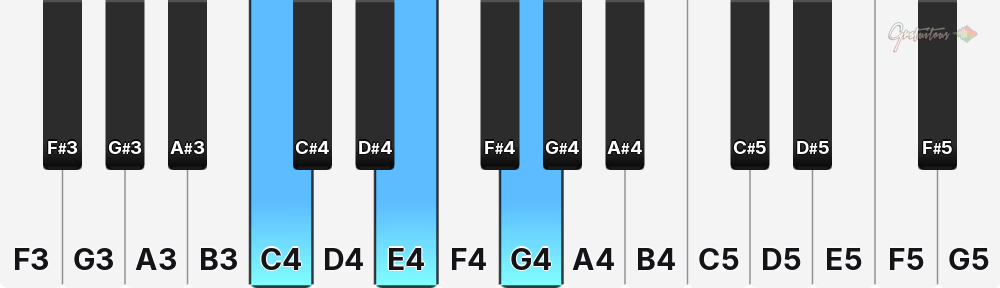
The most common trait you’ll hear about major chords is they sound “happy”. When making a beat, I think of the chord progression as a whole, not a specific major or minor chord – it’s always by ear & emotion.
Personally it’s more important to know what notes are available to me in a Key & Scale, which dictates what chords I’m allowed to play – then it’s a by ear search & find.
Minor Chord Example
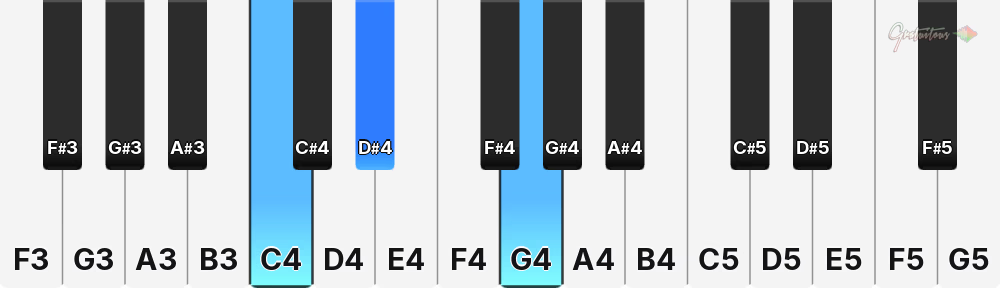
Minor chords are often referred to as “sad” – I find they are amazing for deep emotion, or aggressively fierce hip-hop beats.
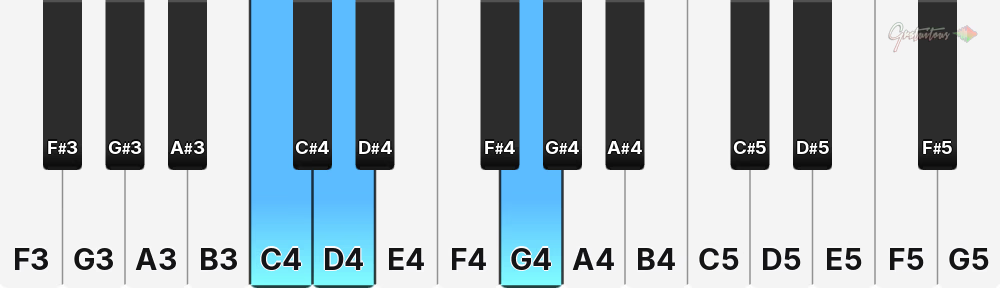
Sus2 Chord Example
Sus4 Chord Example
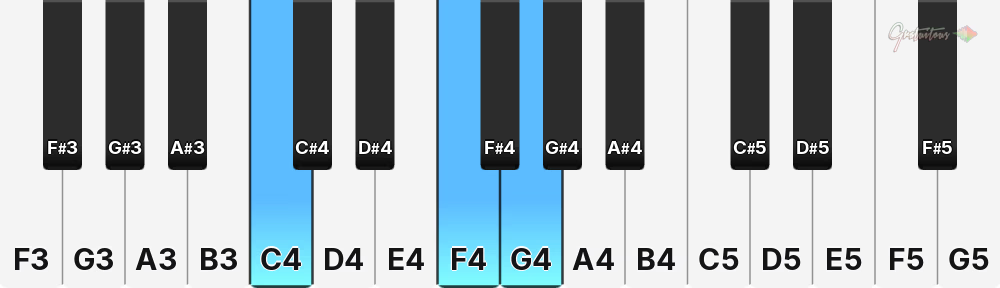
Sus2 chords and Sus4 chords are some of my favorite.
While holding left hand notes, on the right hand I’ll play a chord and switch to its Sus2/Sus4 variation. It is tremendous for feeling & emotion, and staying in the same vibe with a bit of different flavor.
Once I discovered Sus2 and Sus4 chords, in addition with chord inversions (see piano chord tool at top of page), the amount of chord combinations increases quickly, with different feelings to your progressions & more control.
Try it: Switch to the Chord tab, pick C key, and switch between Major, Sus2, and Sus4. The bottom and top note don’t move, it’s the middle note that moves down (Sus2) or moves up (Sus4). And yes, Sus2 & Sus4 chords benefit from inversions, too!
How to Play These Chords in Your DAW’s Piano Roll (FL Studio, Ableton, Logic)
Most DAW piano rolls actually allow you to select a Key & Scale, which highlights those 7 notes you’re allowed to play! (Game changing moment as you’re beginning!)
It will often show you where you’re allowed to place your notes, then you can play with combinations of notes together to make your own chords.
So search something like “How to select key & scale in my DAW’s piano roll” and your DAW probably supports this feature!
What is an Arpeggio?
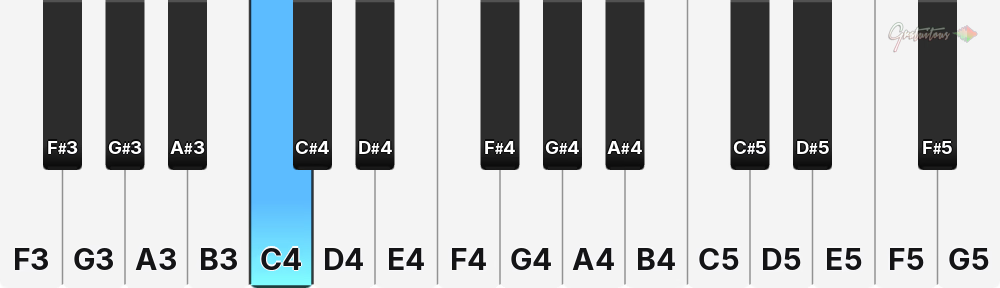
An arpeggio is also known as a broken chord. Instead of a normal chord that plays two or more notes at once, an arpeggio plays a chord one note at a time, in any sequence you desire!
The pattern can be playing the single notes of a chord from bottom to top, top to bottom, or a random sequence.
Press Arp in the piano helper tool above to see one way to play an arpeggio. In real life arpeggios take tons of piano practice, but in music production your DAW or VST plugins make programming them incredibly easy.. see how to use FL Studio’s arpeggiator.
In music production, arpeggios are often used in fast trance dance music for a rushing sound, and when applied with heavy effects like delay, reverb, distortion and filters, you can make almost a whole song out of one arpeggio!
Pro tip: If you also enable portamento (slide/glide) on the arpeggio notes, it gives a whole new flavor to arpeggios; even more so if the VST plugin allows you to adjust note length!
Arpeggios are amazing for fullness, creating melodies you didn’t think were possible, and advanced VSTs give superpowers to your beat’s melodies.
Improvisation – Playing Piano Without Sheet Music
Improvisation means playing piano on the fly, with no sheet music, and making the melody up as you go.
My Piano Lessons for Producers course specializes in this, and helps build muscle memory. All it takes is 5 minutes a day, and in 1-2 years you’ll see massive results in melody making skills.
The whole secret? Staying inside the Key & Scale (the 7 notes) you already learned! You already know those notes are what’s to be used when you play notes & chords, now it’s about learning rhythm, timing, hand placement, and most important, how the melodies can be played over top of your drum loop.
As a producer, improvisation increases as you build your ingenuity skills – creative thinking, trying things & twisting knobs to make things eventually work!
It’s about knowing how different melodies & sounds can work with each other, live in their own frequency space, play at their own time, and complement each other.
It’s about knowing when to play notes, how long to hold down a note, whether to play a single note or a chord in your beat, and when to use an arpeggio!
See how it all comes together?
It truly comes down to understanding a Key & Scale, the 7 notes you’re allowed to play in an octave, learning what chords are available to you, then practicing melodies. I often practice piano over a drum loop (known as a click track) of different types – sometimes a fast dance drum loop, or a slow hip-hop drum loop; this forces me to learn piano in different styles, while keeping the listener interested!
As long as you use the 7 notes available to you in the Key & Scale, you cannot go wrong! You will not play a wrong note that sounds bad – what you will struggle with is timing, playing fast, and reaching for different chord variations.
But guess what? It doesn’t matter as a producer! We program our notes with MIDI Notes! If you make a mistake while recording MIDI Notes in your DAW, you can edit or quantize them to get them working immediately for you.
This is why the secret to my piano course for beatmakers is understanding the Key & Scale, the notes you’re allowed to play, and building improvisation skills.
Syncopation – Why Your Melody Sounds Stiff
New producers’ beats are often rigid & stiff because they stick to beats 1, 2, 3, 4, which doesn’t give the bounce of their favorite beats.
Well, to achieve life in your music, syncopation is when you play notes OFF beat, not on the main 1, 2, 3, 4 beats.
Try saying this: 1.. AND.. 2.. AND.. 3.. AND.. 4.. AND
AND is the OFF beat and brings MASSIVE musicality, letting your head bob back and forth between beats, instead of just on beat.
But saying “AND” is the only form of syncopation would be leading you wrong, too! In FL Studio’s step sequencer one beat has 4 steps. Step 1 is ON BEAT, but Steps 2, 3, 4 are OFF BEAT (and each one has massively different impact on how a beat is made & for what genre).
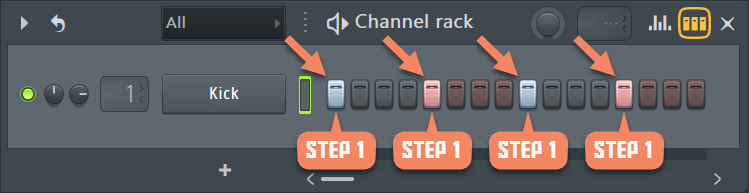
Step 1 is ON BEAT (the strongest beat).
Steps 2, 3, 4 are OFF BEAT (syncopation)
To be clear, stiffness & rigidness in beats is easily fixed in your DAW’s piano roll with note nudging (timing), but syncopation is more under Sound Placement. It’s deliberately using Steps 2, 3, and 4 on the weaker beats.
Explained further in my SAFE SPOTS Drum Loop curriculum for programming drum loops for powerful beats.
Left Hand vs Right Hand (for Beatmakers)
The hardest part of learning piano for beats for me was understanding the job of left and right hand, which have very different jobs.
The left hand is for holding the low-end and adding rhythm (takes tons of practice & skill). It’s a great place for catchy arpeggios or driving the main groove of the track. The left hand is where I generally find the heart and body of the song come from.
The right hand is typically where the main lead and powerful melodies come from & complement the left hand. It’s also great for arpeggios, fast and slow chords, or single note catchy melodies.
In music production, I’ve found the left and right hand are used a little different when it comes to a good mix. For example, on the right hand, because the notes are up higher in the frequency spectrum, you can get away with full 3 note chords sounding clean, but on the left hand, especially when going lower in frequency, I often find myself playing the outside of the chord (not the middle note) as it can congest the mix!
For real piano players, typically the left hand is your bass notes, and the right hand fills in the rest.. but surprisingly with music production a lot of the melody making is with ONE HAND!
The secret is actually how to make the catchiest beat, not be the best musician.
In most of my beats, maybe only 1-2 melodies use both hands, but quickly switch to one-hand melodies once multiple VST instrument patterns play on top of each other.
As an educator, I would like each of my students to learn the piano with improvisation, as it’s so rewarding to record amazing piano melodies into your DAW, and makes editing easier. But realistically, you can get away with playing piano with one hand. (I remember I started using my QWERTY computer typing keyboard for my melodies!)
When buying a MIDI Keyboard I suggest a 49-Key MIDI Keyboard for left & right hand playing, but you can get away with a 25-Key MIDI keyboard and play with one hand.. at the end of the day, the MIDI Controller is there to help you get the melody out of your head into your DAW quicker.
Practicing Piano – 5 to 10 Minutes a Day
I saved the most important tip for last.
To be blunt: you will not see results if you do not practice piano 5-10 minutes a day to learn piano improvisation for beatmaking.
It’s like skateboarding and trying to learn an ollie, or shooting a basketball and making a swish every time.
There’s so much going on in your brain when playing piano, especially over a drum loop, trying to make melodies that truly are catchy and people want to put your music on loop mode.
And the thing is, 5-10 minutes is surprisingly long when you practice the way I teach piano for producers.. you start building your finger & forearm muscles, your brain & hands start to move quicker over time and remember hand placement, but it’s not something that happens in a day, a week, or even a month.
It takes years, so the sooner you start practicing that 5 minute a day routine, the sooner you’ll see results in 1-2 years!
My skills have continued to improve.. just 5 mins a day!
Wrapping Up: Piano Chords for Beatmakers and Producers
I hope that helps you learn piano as a beatmaker, to understand scales, melodies, arpeggios, chords, octaves, and most important IMPROVISATION!
I hope you enjoy my free piano chord tool at the top of this page. It’s a tool I will continue to teach & talk about over the years to help you learn piano for beatmakers.
Bookmark this page.. seriously! Come back any time you start a new beat. Just pick your key & scale, and you’ll know exactly the notes you’re allowed to use.
Remember, in one octave it’s just 12 notes that repeat, and picking a key & scale is the 7 notes you’re allowed to play. This is the information I wanted when I started back around 2009~ and it’s now here for you!
If you want to go past knowing WHICH notes, and actually learn to play them, with improvisation, that’s exactly what my piano lessons for music producers course is for.